
Imagine giving someone the gift of sight in a whole new way. If you want to create smart glasses for a blind person, you’re about to discover how technology can truly change lives.
These glasses don’t just help; they empower. You’ll learn simple, clear steps to build smart glasses that can guide, inform, and connect. Ready to make a real difference? Keep reading, because what you’ll find here could open new doors for someone you care about.
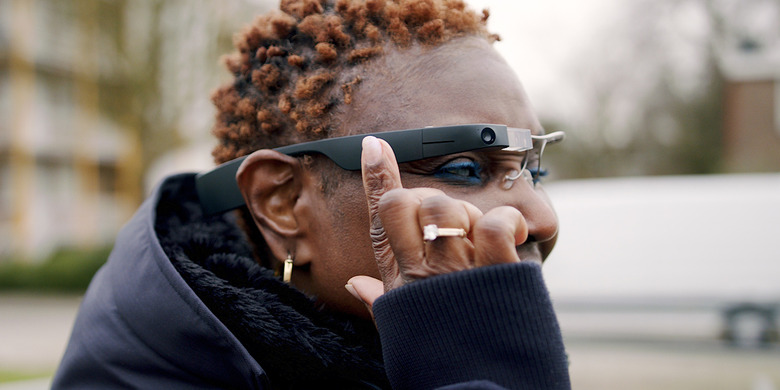
Credit: www.bgr.com
Understanding Smart Glasses Technology
Smart glasses for blind people use technology to help users understand their surroundings. These devices combine sensors, cameras, and software to provide useful feedback. Understanding how smart glasses work helps in building and improving them for better support.
Components Of Smart Glasses
Smart glasses include several key parts that work together:
- Camera:Captures images or videos of the environment.
- Processor:Analyzes data from the camera and sensors.
- Speakers or Bone Conduction Headphones:Deliver audio information to the user.
- Microphone:Allows voice commands for control and interaction.
- Sensors:Detect movement, distance, and obstacles.
- Battery:Powers the device for several hours.
- Frame and Display:Houses all components and may show visual data if needed.
How Smart Glasses Work
The camera scans the surroundings continuously. The processor interprets this data to identify objects and obstacles.
Information converts into audio signals or vibrations. The user hears descriptions or warnings through speakers.
Voice commands let the user control the glasses hands-free. Sensors detect changes in the environment and alert the user.
This real-time feedback helps blind users navigate safely and gain awareness of their environment.

Credit: www.youtube.com
Essential Tools And Materials
Building smart glasses for a blind person requires a clear understanding of the tools and materials you’ll need. Choosing the right components affects the device’s performance and usability. Think about your user’s daily challenges and how each tool can solve a specific problem for them.
Hardware Requirements
Hardware forms the backbone of your smart glasses. You’ll need a compact microcontroller like an Arduino or Raspberry Pi to process inputs and run your software smoothly. Don’t forget a high-quality camera or sensor to capture the environment, which helps the glasses “see” obstacles or read text aloud.
Audio output is crucial—consider small speakers or bone conduction headphones to deliver clear sound without blocking ambient noise. Power supply matters too; lightweight rechargeable batteries keep the device functional all day. Adding vibration motors can give tactile feedback, helping users navigate without relying solely on sound.
- Microcontroller (Arduino, Raspberry Pi)
- Camera or depth sensor
- Speakers or bone conduction headphones
- Rechargeable battery
- Vibration motors for feedback
- Lightweight frame and casing materials
Software Essentials
Smart glasses need software that can interpret data and communicate with the user effectively. Voice recognition software allows hands-free control, which is vital for users who rely on their hearing and touch. Text-to-speech engines transform written information into spoken words, opening up a world of accessible content.
Navigation apps tailored to indoor and outdoor environments can guide users safely. Consider software that supports object recognition and obstacle detection to enhance mobility. You might also want to include customizable settings so each user can adjust the glasses to their preferences.
- Voice recognition platform (Google Speech API, PocketSphinx)
- Text-to-speech engine (eSpeak, Google TTS)
- Navigation and mapping software
- Object recognition algorithms
- Customizable user interface
Designing The Framework
Designing the framework for smart glasses tailored to blind users is a crucial step that shapes the entire user experience. The frame must balance comfort, durability, and functionality without overwhelming the wearer. This phase involves careful choices about materials and technology placement to ensure the glasses feel natural and deliver reliable assistance.
Selecting The Frame
Choosing the right frame means thinking about weight and fit first. Heavy glasses can cause discomfort, especially when worn for long periods. Lightweight materials like titanium or high-quality plastic often work best because they reduce strain on the nose and ears.
Next, consider the shape and size. The frame should sit securely without slipping, even during movement. Adjustable nose pads and flexible temples help customize the fit for different face shapes.
Remember, the frame isn’t just a holder—it’s part of the user’s daily life. How often do you wear glasses comfortably? That same comfort level is essential here to encourage consistent use.
Integrating Sensors
Sensors are the heart of smart glasses for blind users. You need to place them where they can gather accurate data without obstructing vision or adding bulk. Common sensors include cameras, proximity detectors, and motion sensors.
Think about the sensor placement carefully. For example, a small camera on the front can capture environmental details, while ultrasonic sensors on the sides can detect nearby obstacles. This setup mimics how sighted people naturally scan their surroundings.
Power consumption and connectivity also matter. Sensors should connect seamlessly to the processing unit without causing overheating or draining the battery quickly. Have you tested how these sensors perform in real-life situations like crowded streets or dim lighting?
Building The Electronic Circuit
Building the electronic circuit is key to making smart glasses for a blind person. This circuit acts as the brain of the device. It processes data from sensors and controls actuators that give feedback to the user. Careful planning and assembly ensure the glasses work smoothly and reliably.
Microcontroller Setup
The microcontroller is the core chip that runs the smart glasses. Choose one with low power use and enough pins for sensors and actuators. Popular choices include Arduino Nano or ESP32.
Start by installing the microcontroller on a small breadboard or PCB. Connect it to a power source, like a rechargeable battery. Program the microcontroller with simple code to read sensor data and control outputs.
Test the microcontroller separately before adding other parts. This step ensures it works properly and avoids future issues.
Connecting Sensors And Actuators
Sensors gather information about the environment. Common sensors for smart glasses include ultrasonic for obstacle detection and light sensors for brightness.
Actuators provide feedback to the user. Examples are vibration motors or audio speakers.
- Connect sensors to the microcontroller’s input pins.
- Attach actuators to output pins.
- Use jumper wires for easy connections.
- Secure components on a board to avoid loose wires.
Double-check each connection to prevent short circuits. Run test programs to verify sensors detect correctly and actuators respond as expected.
Developing The Software
Developing the software for smart glasses designed for blind users is a critical step that shapes the device’s usability and effectiveness. The software controls how the glasses interpret the environment and communicate information back to the wearer. Creating intuitive and responsive software ensures that the glasses truly assist users in navigating their surroundings with confidence.
Programming Basics
Start by choosing a programming language that supports hardware interaction and voice processing, such as Python or JavaScript. These languages offer libraries that simplify tasks like image recognition and audio output, which are essential for smart glasses.
You’ll need to work with sensors like cameras and microphones to gather real-time data. Writing clean, efficient code helps the glasses process this data quickly, reducing any lag that could confuse the user.
Think about how the software will handle errors or unclear inputs. Designing fallback options, like repeating information or asking for clarification, makes the device more reliable and user-friendly.
Voice Command Integration
Voice commands are a game-changer for accessibility. Integrating voice control allows users to interact with the glasses hands-free, which is vital for blind individuals who rely heavily on auditory input.
You can use APIs such as Google Speech-to-Text or Amazon Alexa Voice Service to convert spoken commands into actions. These services understand natural language, making it easier for users to communicate naturally.
Consider how the system responds to commands. Immediate and clear audio feedback reassures users that their requests are understood and executed. Have you thought about including customizable commands tailored to individual preferences?
Testing your voice integration in noisy environments is crucial. It ensures the glasses remain functional even in challenging real-world situations, which your users will appreciate.
Testing And Troubleshooting
Testing and troubleshooting are crucial when building smart glasses for a blind person. You want to ensure every feature works smoothly before the glasses reach the user. Catching issues early saves time and improves the overall experience.
Functional Tests
Start by checking each component separately. Test the voice commands to confirm the glasses respond accurately. Make sure the audio output is clear and loud enough in different environments.
Next, verify the object detection feature by walking around various obstacles. Does the glasses alert you promptly? Testing in real-life situations helps identify gaps you might miss in the lab.
Finally, check the battery life under normal usage. Does it last as expected? A short battery life can frustrate users and limit usefulness.
Common Issues And Fixes
If the voice commands don’t register, check the microphone’s connection first. Sometimes a loose wire causes the problem.
Audio distortion often comes from a damaged speaker or software glitches. Try resetting the device or replacing the speaker if necessary.
When object detection fails, recalibrate the sensors or update the firmware. Dirt on sensors can also block signals, so keep them clean.
Battery drains quickly? Look for power-hungry apps running in the background or faulty battery cells. Replacing the battery might be the solution.
Have you ever faced a problem that seemed impossible to fix at first? Sometimes the answer lies in simple checks rather than complex solutions. What small step will you take to test your smart glasses today?
Optimizing For Comfort And Usability
Designing smart glasses for blind users requires a focus on comfort and ease of use. The device should feel natural and light on the face. Users must wear the glasses for long periods without discomfort. Balancing technology with comfort ensures better adoption and daily use. Usability also plays a key role in making the glasses effective and user-friendly.
Ensuring Wearability
The frame must be lightweight and made from soft materials. Adjustable nose pads and flexible temples help fit different face shapes. Ventilation prevents sweating and skin irritation. The glasses should not press too hard on any part of the head.
- Use hypoallergenic materials to avoid skin reactions.
- Design with balanced weight distribution for stability.
- Include padding in contact areas for extra comfort.
- Make the frame durable but light.
User Feedback Implementation
Collecting user feedback guides design improvements. Early testing with blind users reveals real-world challenges. Simple controls and clear audio feedback improve usability. Regular updates based on feedback keep the device relevant and helpful.
- Conduct interviews and usability tests often.
- Note difficulties users face during daily tasks.
- Implement easy-to-use buttons or voice commands.
- Adjust audio volume and clarity based on user input.

Credit: www.youtube.com
Safety Considerations
Safety is the foundation of creating smart glasses for a blind person. These devices interact closely with the user’s body and environment, so every component must be carefully evaluated to prevent harm. Overlooking safety can lead to discomfort, malfunction, or even accidents.
Battery Safety
The battery powers your smart glasses, but it can also pose risks if not handled correctly. Choose batteries with built-in protection circuits to avoid overheating or short circuits. Using certified lithium-ion or lithium-polymer batteries ensures higher quality and reliability.
Always place the battery in a secure, insulated compartment to prevent damage from drops or moisture. Have you considered how easy it is for your device to overheat during extended use? Adding thermal sensors or automatic shutoff features can protect both the user and the device.
Sensor Calibration
Accurate sensor data is crucial for safe navigation and interaction. Calibrating sensors regularly prevents errors that could misguide the user. For example, a misaligned distance sensor might cause the user to misjudge obstacles, leading to falls or collisions.
Test your sensors in different lighting and environmental conditions to maintain consistency. Can your sensors adapt to sudden changes, like moving from a bright room to a dim hallway? Implementing dynamic calibration routines helps keep the device reliable in real life situations.
Future Enhancements
Future enhancements will make smart glasses for blind users more helpful and easier to use. New technology can improve how these glasses work in daily life. These upgrades will add features and fix current limits. The goal is to provide better support and more independence.
Advanced Features
Smart glasses can include voice recognition to respond to commands quickly. Sensors can detect obstacles and warn the user in real time. Integration with GPS can guide users safely in new places. Cameras can read text aloud from signs and documents. Artificial intelligence can learn user habits to offer personalized help.
Potential Improvements
- Smaller and lighter design for more comfort.
- Longer battery life for all-day use.
- Better noise reduction to improve sound clarity.
- More durable materials to withstand daily wear.
- Faster processing for immediate responses.
- Improved connectivity with smartphones and other devices.
Frequently Asked Questions
What Technology Is Used In Smart Glasses For Blind Persons?
Smart glasses for the blind use cameras, sensors, and AI to detect surroundings. They convert visual data into audio or tactile feedback, aiding navigation and object recognition effectively.
How Do Smart Glasses Assist Blind Users Daily?
They provide real-time environmental information, recognize faces, read text aloud, and guide users through audio cues. This technology enhances independence and safety in everyday activities.
Can I Build Smart Glasses At Home For The Blind?
Yes, by combining affordable components like Raspberry Pi, cameras, and text-to-speech modules. Basic programming skills and knowledge of electronics are essential to customize features.
Are Smart Glasses Affordable For Blind Individuals?
Prices vary widely, but DIY models reduce costs significantly. Some commercial options are expensive, while open-source projects offer budget-friendly alternatives for accessibility.
Conclusion
Creating smart glasses for blind people can bring real help daily. Simple steps and clear ideas make the process easier. Using affordable parts keeps the project within reach. Testing often helps catch mistakes early on. Focus on comfort and ease of use for the wearer.
Small changes can improve vision and independence. Everyone can contribute to making life better with tech. Start with small goals and build from there. This work shows how technology supports people with challenges. Keep learning and improving as you go forward.






