Installing a smart doorbell can instantly boost your home’s security and convenience. But if the idea of wiring it sounds tricky, don’t worry—you’re in the right place.
This guide breaks down the steps clearly, so you can feel confident handling the wiring yourself. By the end, you’ll know exactly how to connect your smart doorbell safely and quickly. Ready to take control of your front door? Let’s dive in.

Credit: www.reddit.com
Choosing The Right Smart Doorbell
Choosing the right smart doorbell makes installation and daily use easier. It also improves home security and convenience. Consider your home’s setup and your needs before buying. This helps you pick a device that fits perfectly.
Types Of Smart Doorbells
Smart doorbells come in several types. Each offers unique features and power sources.
- Wired Doorbells:Connect to existing doorbell wiring. Provide constant power and reliable operation.
- Battery-Powered Doorbells:Easy to install anywhere. Require regular battery changes or recharging.
- Video Doorbells:Include built-in cameras. Allow live video and recording of visitors.
- Chime-Compatible Doorbells:Work with your home’s indoor chime. Notify you with sound when pressed.
Features To Consider
Focus on features that improve security and ease of use.
- Video Quality:Look for at least 1080p resolution for clear images.
- Field of View:Wide-angle lenses cover more area around your door.
- Motion Detection:Alerts you when someone approaches your door.
- Two-Way Audio:Speak directly to visitors through the doorbell.
- App Compatibility:Ensure the doorbell works with your smartphone’s operating system.
- Night Vision:Clear video even in low light or darkness.
- Installation Needs:Check if wiring or tools are required for setup.
Credit: www.clarecontrols.com
Tools And Materials Needed
Wiring a smart doorbell requires having the right tools and materials. Having everything ready makes the installation easier and safer. This section lists the essential tools and some optional accessories that can help you during the process.
Essential Tools
- Screwdriver set (Phillips and flathead)
- Wire stripper and cutter
- Voltage tester or multimeter
- Drill with appropriate bits
- Electrical tape
- Level tool
- Mounting screws and anchors (usually included with the doorbell)
Optional Accessories
- Wire connectors or wire nuts
- Extension wires for longer distances
- Caulk or sealant to protect against weather
- Power drill with screwdriver bits for faster installation
- Labeling tape to mark wires for easy identification
Preparing For Installation
Preparing for installation is a key step before wiring your smart doorbell. It ensures safety and smooth setup. Taking time now helps avoid common issues later.
Checking Existing Doorbell Wiring
First, find your current doorbell wiring. Look near the doorbell button and the chime inside your home. Identify the wires connected to the old doorbell. They are usually two thin wires.
Check the wires for damage or corrosion. Clean or replace them if needed. Note the wire colors and where they connect. This helps match connections with the new smart doorbell.
Turning Off Power
Safety comes first. Turn off the power to your doorbell at the circuit breaker. This prevents electric shock during installation. Use a voltage tester to confirm no power flows to the wires.
Never skip this step. Even low voltage wires can cause injury. Wait a few minutes after switching off the breaker. This ensures all electrical components are safe to handle.
Installing The Mounting Bracket
Installing the mounting bracket is a crucial part of wiring your smart doorbell. It sets the foundation for a secure and functional setup. Getting this right ensures your doorbell stays put and works perfectly every time someone rings it.
Positioning The Bracket
Choose a spot near your door that’s easy to reach and within Wi-Fi range. Think about the viewing angle too—your doorbell camera should capture visitors clearly without glare from the sun or porch lights.
Check the height as well. Most doorbells work best when mounted about 48 inches from the ground, which is roughly at eye level for most people. This placement helps the camera catch faces clearly without awkward angles.
Have you considered the weather? If your door faces harsh elements, look for a spot with some cover or plan to add a small protective shield to keep the bracket safe over time.
Securing The Bracket
Once you’ve found the perfect spot, hold the bracket against the wall and mark the screw holes with a pencil. Use a level tool to make sure it’s perfectly horizontal—crooked brackets can throw off the camera angle.
Drill pilot holes where you marked, especially if you’re mounting on brick or concrete. Use wall anchors to provide extra grip if the surface is soft or drywall.
Attach the bracket with the provided screws, tightening them firmly but without overdoing it. Over-tightening can crack the bracket or damage the wall, which you want to avoid.
Test the bracket’s stability by gently tugging it. If it feels loose, double-check your anchors and screws before moving on. A shaky bracket means a shaky doorbell feed—and that’s not what you want when expecting visitors.
Connecting The Doorbell Wires
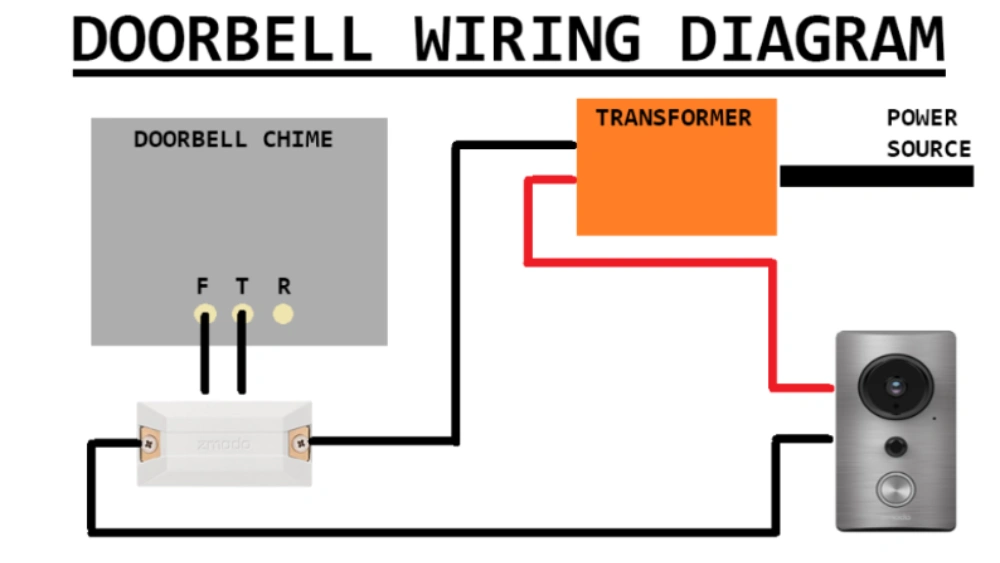
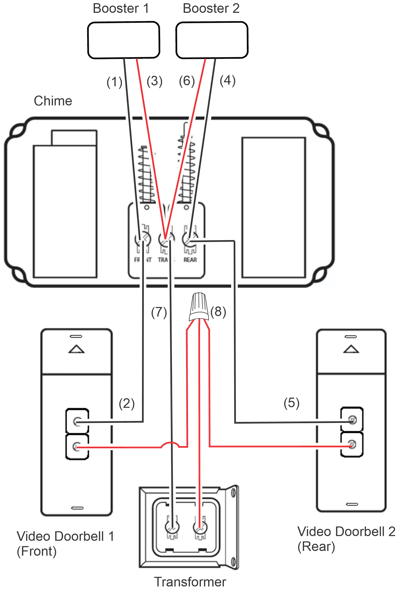
Connecting the doorbell wires is a critical step in setting up your smart doorbell. It ensures your device receives the power it needs and communicates properly with your home’s chime system. Handling these wires carefully can save you time and prevent frustrating troubleshooting later on.
Matching Wire Colors
Most doorbell wires come in standard colors like red, white, and sometimes green or yellow. Typically, the red wire connects to the transformer or power source, while the white wire leads to the chime. However, your home’s wiring might differ, so don’t assume colors match perfectly.
Before you connect, use a voltage tester to identify which wire carries power. This simple step protects you from connecting wires incorrectly and potentially damaging your new smart doorbell. Have you ever assumed wire colors matched only to find out otherwise? Testing prevents that headache.
Securing Connections
Once you identify the correct wires, make sure to strip about half an inch of insulation from each wire for a clean connection. Wrap the wires securely around the terminals or insert them firmly into push-in connectors on the doorbell. Loose connections can cause intermittent power loss or signal issues.
Use a screwdriver to tighten terminal screws snugly without over-tightening, which might damage the wire. If your smart doorbell uses wire nuts, twist them on tightly and give a gentle tug to confirm they’re secure. Remember, a solid connection means reliable performance every time someone rings your doorbell.

Credit: wasserstein-home.com
Mounting The Smart Doorbell
Mounting the smart doorbell is a key part of installation. Proper placement ensures clear video and easy access. Follow simple steps to secure the device firmly. This helps avoid damage and keeps the doorbell working well for years.
Attaching To Bracket
Start by aligning the doorbell with the mounting bracket. Hold the device steady against the bracket. Use screws that came with the doorbell to fix it in place. Tighten screws with a screwdriver until the doorbell feels secure. Avoid over-tightening to prevent cracking the unit.
Adjusting Angle
Check the camera view on your phone app after mounting. Adjust the angle to cover the doorway fully. Some brackets allow tilting or swiveling for a better view. Loosen the adjustment screws slightly to move the doorbell. Tighten them again once the angle is right. Ensure the camera captures visitors clearly without blind spots.
Configuring The Smart Doorbell
Configuring your smart doorbell is essential for smooth operation. It ensures the device connects properly and works as expected. This process mainly involves connecting the doorbell to your Wi-Fi and setting up its app.
Connecting To Wi-fi
Start by turning on your smart doorbell. Look for the Wi-Fi setup mode, often indicated by a blinking light. Open your phone’s Wi-Fi settings and connect to the doorbell’s temporary network. Once connected, open the doorbell app or a browser to access the setup page. Select your home Wi-Fi network from the list. Enter the Wi-Fi password carefully and confirm. The doorbell will connect to your network and the blinking light will change to solid or turn off. This step allows your doorbell to communicate with your phone and the internet.
Setting Up The App
Download the doorbell’s official app from your app store. Create a new account or log in if you already have one. Follow the app’s instructions to add your new device. The app will search for your doorbell on the network. Confirm the connection by entering any required codes shown on the doorbell or app. Customize your settings such as notification preferences and video quality. Test the live feed to ensure the doorbell streams video correctly. The app lets you control and monitor your doorbell anytime, even when away from home.
Testing Your Setup
After wiring your smart doorbell, testing the setup is essential. This step confirms everything works as expected. It helps catch problems early before daily use.
Ensuring Functionality
Start by pressing the doorbell button. Listen for the chime inside your home. Check if the doorbell camera activates on your phone. Make sure notifications arrive promptly. Test the microphone and speaker for clear audio. Observe the video quality during live view. Confirm the doorbell connects to your Wi-Fi network without issues.
Troubleshooting Common Issues
If the doorbell does not ring, verify the power source. Ensure wires are securely connected. Restart your Wi-Fi router to fix connection problems. Reset the doorbell to factory settings if needed. Check the app for error messages or updates. Replace batteries if the device uses them. Consult the user manual for specific error codes.
Enhancing Security Features
Enhancing the security features of your smart doorbell turns a simple device into a powerful guardian for your home. The right setup lets you catch suspicious activity early and respond quickly. These features don’t just alert you—they give you control over what you want to monitor and how you get notified.
Utilizing Motion Detection
Motion detection is one of the smartest ways your doorbell can protect your home. You can set it to trigger alerts when someone approaches, even before they ring the bell. This early warning is crucial if you want to keep an eye on packages or spot potential intruders.
Adjust the sensitivity so it doesn’t get overwhelmed by passing cars or pets. I once had my doorbell alert me late at night because a raccoon wandered close—annoying but better safe than sorry. You can also define specific zones, like the front porch or driveway, to focus on areas that matter most.
Customizing Alerts
Not all alerts need to be treated the same. Customizing alerts lets you decide which notifications are urgent and which can wait. For example, you might want instant alerts for someone pressing the doorbell but only a daily summary of motion events.
Many smart doorbells allow you to choose how you receive alerts—via app notifications, email, or even smart home speakers. This flexibility helps you stay informed without feeling overwhelmed. Ask yourself: how often do you want to be disturbed? Tailoring your alerts helps keep your peace of mind intact while staying secure.
Regular Maintenance Tips
Regular maintenance keeps your smart doorbell working well. It helps avoid glitches and extends the device’s life. Small tasks done regularly make a big difference. Here are simple tips to keep your doorbell in top shape.
Cleaning The Doorbell
Dirt and dust can block the camera and sensors. Use a soft cloth to wipe the surface gently. Avoid harsh chemicals that may damage the lens or casing. Check the button for grime and clean it carefully. Keep the area around the doorbell free from spider webs and debris. This ensures clear video and reliable operation.
Updating Software
Smart doorbells rely on software to work properly. Check for updates regularly in the app. Updates fix bugs and add new features. Connect your doorbell to Wi-Fi before updating. Follow the app instructions to complete the process. Updating keeps your device secure and running smoothly.
Frequently Asked Questions
What Tools Are Needed To Wire A Smart Doorbell?
You need a screwdriver, wire stripper, voltage tester, and drill. These tools ensure safe and efficient installation of your smart doorbell.
Can I Wire A Smart Doorbell Without Existing Doorbell Wires?
Yes, you can use a plug-in adapter or battery-powered model. These options eliminate the need for existing doorbell wiring.
How Do I Connect The Smart Doorbell To The Chime?
Connect the doorbell wires to the chime’s terminals according to instructions. This completes the circuit and activates the chime sound.
Is It Necessary To Turn Off Power Before Wiring?
Always turn off power at the breaker to avoid electric shock. Safety is crucial when working with electrical wiring.
Conclusion
Wiring a smart doorbell is easier than it seems. Follow each step carefully for best results. Safety matters most—turn off power before starting work. Test the doorbell once wiring is complete. Enjoy the convenience of seeing visitors on your phone.
Smart doorbells add security and ease to any home. Take your time and double-check connections to avoid issues. Now, you are ready to upgrade your entryway confidently.






