
Are you tired of coming home to a dark yard or worrying if you left your outdoor lights on all night? Setting outdoor timers for your lights can solve these problems easily.
Imagine your porch lighting up exactly when you want it to—without you having to lift a finger. You’ll discover simple steps to take control of your outdoor lighting. By the end, you’ll know how to save energy, boost your home’s security, and add convenience to your daily routine.
Keep reading and make your outdoor lighting smarter today!
Benefits Of Outdoor Timers
Outdoor timers offer many benefits that improve how you use your exterior lighting. They help save energy, boost home security, and provide great convenience. Setting timers means your lights work exactly when needed, without extra effort.
Energy Efficiency
Timers reduce electricity waste by turning lights off automatically. They ensure lights operate only during dark hours or specific times. This lowers your electric bill and helps protect the environment. Using a timer avoids leaving lights on all night by accident.
Enhanced Security
Timers make your home look lived-in even when you are away. Lights turn on and off at set times, deterring burglars. This simple trick can prevent unwanted visitors. Well-lit areas also reduce the chance of accidents outside your home.
Convenience And Automation
Timers allow you to control lights without manual switching. You can set schedules once and forget about turning lights on or off. This automation saves time and effort every day. It also helps maintain a consistent lighting routine effortlessly.
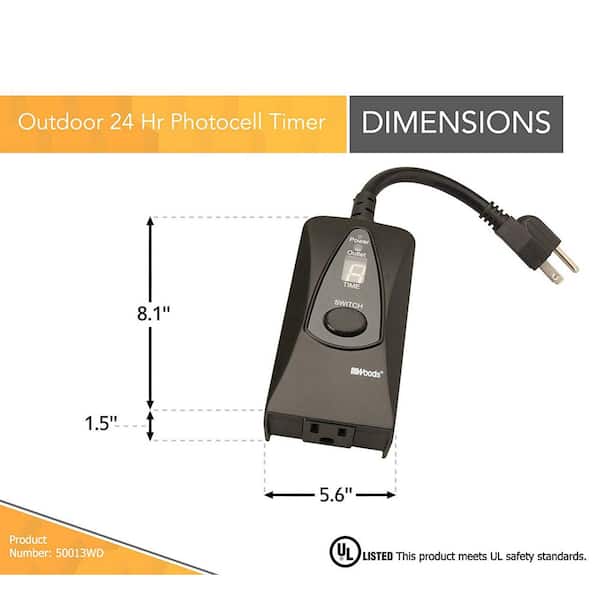
Credit: www.homedepot.com
Types Of Outdoor Timers
Outdoor timers help control when your lights turn on and off. They save energy and add security. Different types of timers offer various features and ease of use. Knowing the types helps you pick the right one for your needs.
Mechanical Timers
Mechanical timers work with a dial and pins. You set the pins at the times you want lights on or off. They are simple and do not need batteries or Wi-Fi. These timers are affordable and easy to use. They fit well for basic outdoor lighting needs.
Digital Timers
Digital timers use buttons and a screen to set times. They allow more precise control over lighting schedules. Many models have multiple on/off settings per day. Some digital timers include a battery backup. This keeps settings safe during power outages.
Smart Wi-fi Timers
Smart Wi-Fi timers connect to your home internet. You control them using a smartphone app. These timers offer flexible scheduling and remote access. Some can sync with sunrise and sunset times. They also work with voice assistants for easy control.
Choosing The Right Timer
Choosing the right timer for outdoor lights ensures easy control and saves energy. The ideal timer fits your needs and matches your outdoor setup. Select a timer that works well with your light fixtures. It must endure outdoor weather conditions. Also, consider how you want to power the timer.
Compatibility With Fixtures
Check if the timer supports your light type. Some timers work only with LED or incandescent bulbs. Others handle both without issues. Verify the wattage limit of the timer. Exceeding it can cause damage or failure.
Look for timers that fit your fixture’s plug or wiring style. Some timers plug directly into outlets. Others connect inside the fixture or fuse box. Choose one that suits your setup for easy installation.
Weather Resistance
Outdoor timers must resist rain, snow, and dust. Look for timers labeled as waterproof or weatherproof. Materials like durable plastic or metal offer good protection. Sealed buttons and covers help keep moisture out.
Consider timers with an IP (Ingress Protection) rating. A rating of IP44 or higher is ideal for outdoor use. This rating shows the timer can handle splashes and dirt.
Power Source Options
Timers come with different power sources. Plug-in timers draw power from an outdoor outlet. Battery-powered timers offer flexibility for areas without outlets.
Solar-powered timers charge during the day and run at night. They save energy but may need direct sunlight. Choose a power option that fits your location and convenience.

Credit: www.reddit.com
Preparing For Installation
Preparing for installation is an essential step in setting outdoor timers for lights. This phase ensures that the process goes smoothly and safely. By gathering the right tools and materials, understanding safety precautions, and locating power sources, you set the groundwork for a successful installation. Each aspect is crucial and can significantly impact the efficiency and functionality of your outdoor lighting.
Gathering Tools And Materials
Start by collecting all necessary tools and materials. You will need a screwdriver, electrical tape, and wire connectors. These tools help ensure secure connections. Make sure your timer matches your lighting system. Check compatibility to avoid issues later. Having everything ready saves time and prevents frustration.
Safety Precautions
Safety should be your top priority. Turn off the power at the main switch. This prevents electrical shocks during installation. Wear rubber gloves for additional protection. Ensure your workspace is dry and clean. Wet conditions can lead to dangerous situations. Always follow manufacturer instructions carefully.
Locating Power Sources
Identify where your power sources are located. Outdoor timers need access to electricity. Find outlets close to your light fixtures. This reduces the need for long cables. Check if your power source can handle the timer’s load. Too much load can cause power failures. Make sure the location is accessible for future maintenance.
Step-by-step Timer Setup
Setting up outdoor timers for your lights can transform your home’s exterior into a well-lit, welcoming space without wasting energy. The process might seem technical at first, but it becomes straightforward once you understand the basic steps. Here’s a clear, hands-on guide to help you set your timer quickly and correctly.
Setting The Current Time
Start by locating the dial or digital display on your timer. This is where you set the current time, which is crucial for the timer to operate accurately.
Turn the dial clockwise until the arrow or marker points to the correct hour and minute. Make sure you match AM and PM settings if your timer distinguishes between them.
Some timers have a small switch or button to set the clock mode—check that it’s on “Clock” or “Time” mode rather than “Program” mode before adjusting.
Programming On And Off Cycles
Most outdoor timers allow you to set multiple on and off periods throughout the day. Look for small tabs or segments around the dial or buttons on digital timers to program these cycles.
- Push down or slide the segments corresponding to the times you want your lights to turn on.
- Leave the segments up or unpressed for the off periods.
Digital models might require you to enter the specific on/off times using buttons. It helps to write down the desired schedule before programming to avoid mistakes.
Have you considered how your lighting needs change between weekdays and weekends? Some timers offer separate settings to handle this easily.
Testing The Timer Function
After programming, test your timer to ensure it switches your lights on and off as expected. Manually advance the dial or use the override button to simulate time passing.
Observe if the lights respond correctly during the programmed on and off times. This step prevents surprises once your timer is controlling the lights unattended.
If the lights don’t follow the schedule, double-check your time settings and programming. Small errors like AM/PM confusion or incorrectly pressed segments are common culprits.
Tips For Maximizing Energy Savings
Maximizing energy savings with outdoor timers isn’t just about setting them and forgetting them. Smart adjustments and combining the right tools can drastically cut down your electricity bill while keeping your outdoor spaces well-lit when needed. Let’s look at some practical ways you can get the most out of your outdoor lighting setup.
Adjusting Schedules Seasonally
Daylight changes throughout the year, so your timer schedules should change too. If you keep the same timing year-round, your lights might turn on too early in the summer or too late in the winter. Adjust your timers every few months to match sunrise and sunset times.
For example, setting your lights to turn on 30 minutes after sunset ensures you’re not wasting energy during daylight hours. You can use smartphone apps or websites that track local sunset and sunrise times to make these changes easy. Have you checked your timer settings since the last season change?
Combining With Motion Sensors
Motion sensors can add an extra layer of energy efficiency by only turning lights on when someone is nearby. This means your outdoor lights aren’t running all night unnecessarily. Pairing timers with motion sensors means your lights stay off during scheduled off-hours but come on instantly when motion is detected.
Think about your driveway or backyard paths—do you really need constant lighting, or just enough to catch movement? This combination can cut your lighting energy use by more than half while keeping your home secure and welcoming.
Using Led Bulbs
Even the best timer won’t save much energy if your bulbs use too much power. Switching to LED bulbs for your outdoor lights is one of the simplest ways to reduce electricity consumption. LEDs use up to 80% less energy than traditional incandescent bulbs and last much longer.
Plus, LEDs come in many colors and brightness levels, so you can customize your outdoor lighting to suit your needs without compromising on energy savings. Have you considered replacing your old bulbs with LEDs yet? It’s a quick upgrade that pays for itself over time.
Troubleshooting Common Issues
Troubleshooting outdoor timers can be simple with the right steps. Many issues come from basic errors. Identifying the problem helps fix it quickly. Common problems include the timer not turning on or off, power supply troubles, and needing to reset the timer.
Timer Not Turning On Or Off
Check if the timer is set to the correct mode. The timer should be in “auto” or “timer” mode, not “off” or “on” permanently. Make sure the current time is set correctly. Incorrect time settings cause the timer to ignore schedules.
Inspect the timer’s dial or digital display for damage. Broken parts may stop the timer from working. Clean the timer and remove dirt or debris that might block moving parts.
Power Supply Problems
Confirm the power source is working. Test the outlet with another device. A tripped circuit breaker or blown fuse can cut power to the timer. Reset breakers or replace fuses if needed.
Check for loose wires or damaged plugs. Secure any loose connections and replace damaged cords. Moisture or water inside the timer can cause power issues. Make sure the timer is dry and rated for outdoor use.
Resetting The Timer
Resetting can fix many issues. Find the reset button or switch on the timer. Use a small tool like a pin to press it gently. Hold the reset button for a few seconds, then release.
After resetting, reprogram the timer with the correct time and settings. This clears errors and restores normal function. If problems continue, consult the timer’s manual or contact the manufacturer for help.

Credit: www.aliontimer.com
Frequently Asked Questions
How Do Outdoor Timers Save Energy With Lights?
Outdoor timers automatically turn lights on and off. This avoids lights running unnecessarily. It reduces electricity use and cuts energy bills. Timers provide convenience and improve security by lighting only when needed.
What Types Of Outdoor Timers Work Best For Lights?
Mechanical and digital timers both work well outdoors. Digital timers offer precise scheduling and multiple settings. Choose timers rated for outdoor use to resist weather and moisture for long-lasting performance.
How Do I Set The Correct Time On An Outdoor Timer?
To set the time, first plug the timer in. Rotate the dial or use buttons to match the current time. Ensure AM/PM settings are correct. Follow the manufacturer’s instructions for your specific model.
Can Outdoor Timers Control Multiple Lights Simultaneously?
Yes, outdoor timers can control multiple lights if wired properly. Use a timer with suitable load capacity. Connect all lights to the timer to synchronize on/off schedules easily.
Conclusion
Setting outdoor timers for lights saves energy and adds safety. Timers help control when lights turn on and off. You can enjoy well-lit outdoor spaces without wasting power. Choose the right timer for your needs and follow the steps carefully.
Regularly check and adjust the settings as seasons change. This simple tool makes your home more secure and convenient. Try setting outdoor timers today and notice the difference it brings. Small changes lead to big benefits.






