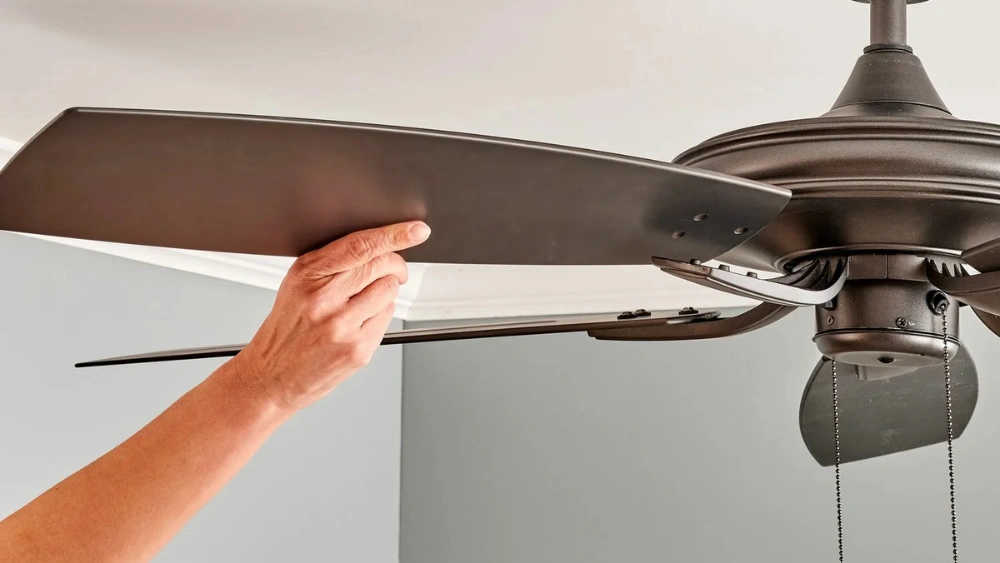
Is your ceiling fan swaying and making you uneasy every time it spins? You’re not alone, and the good news is, fixing it might be easier than you think.
A shaky ceiling fan isn’t just annoying—it can be unsafe and waste energy. Imagine enjoying a cool breeze without that distracting wobble or worrying about it falling. In this guide, you’ll discover simple steps to stop the swaying, improve your fan’s performance, and bring peace back to your room.
Keep reading to learn how to take control and get your ceiling fan running smoothly again.
Common Causes Of Swaying Fans
Noticing your ceiling fan sway can be unsettling, especially when you expect it to run smoothly and quietly. Understanding why your fan sways is key to fixing the issue quickly and safely. Let’s look at the most common reasons behind a swaying ceiling fan so you can address them with confidence.
Imbalanced Fan Blades
One of the top reasons a ceiling fan sways is uneven blade weight or shape. If one blade is heavier or bent, it throws off the balance and causes wobbling. You can check this by visually inspecting each blade or using a blade balancing kit to find the trouble spot.
Have you ever noticed dust buildup on just one blade? That can also cause imbalance. Cleaning your blades regularly might save you from a wobble.
Loose Mounting Bracket Or Screws
Your ceiling fan relies on a secure mounting bracket to stay stable. Over time, screws can loosen from vibrations or improper installation. This looseness creates movement and swaying during operation.
Try tightening all the screws around the bracket and the fan itself. You might be surprised how much difference this simple fix makes.
Unlevel Ceiling Or Fan Installation
If your ceiling isn’t perfectly flat or the fan was installed at a slight angle, swaying can occur. Even a small tilt shifts the balance and leads to wobbling. Use a level to check the fan’s alignment and adjust the mounting if needed.
Have you ever installed a fan and thought it looked straight but it wasn’t? This subtle detail can cause major annoyance down the road.
Worn Out Or Damaged Bearings
The fan’s motor contains bearings that allow the blades to spin smoothly. When these bearings wear out or get damaged, the fan can wobble and sway. Listen for unusual noises or rough spinning to identify this problem.
Replacing the bearings or the entire motor may be necessary if you notice persistent wobbling despite other fixes.
Incorrect Fan Blade Angle (pitch)
Fan blades have a specific pitch angle designed to push air efficiently. If the blades have been replaced with ones of a different pitch or if they are bent, the fan can sway. Check the blade angle and compare it with the manufacturer’s specifications.
Adjusting or swapping blades back to the correct pitch can stabilize your fan and improve airflow.
Safety Precautions
Safety is the top priority when fixing a swaying ceiling fan. Ignoring precautions can cause injuries or damage. Always prepare the work area and tools carefully before starting. A secure approach prevents accidents and ensures the fan works properly afterward.
Turn Off Power At The Circuit Breaker
Switch off the fan’s power at the circuit breaker. Do not rely only on the wall switch. This step stops electric shocks during the repair. Confirm the power is off by trying to turn on the fan after switching it off.
Use A Sturdy Ladder Or Step Stool
Choose a stable ladder or step stool that reaches the fan easily. Avoid standing on chairs or unstable furniture. Place the ladder on a flat surface. Have someone hold the ladder if possible.
Wear Safety Goggles And Gloves
Protect your eyes from dust and falling debris by wearing goggles. Gloves protect your hands from sharp fan parts and screws. Use gloves with good grip to handle tools safely.
Check Fan Blades And Mounting Bracket For Damage
Inspect blades and mounting bracket before touching the fan. Look for cracks, bends, or loose screws. Do not attempt repairs if parts are severely damaged. Replace damaged parts to avoid accidents later.
Keep Tools And Parts Organized
Arrange tools and parts in one spot before starting. Use a small container for screws and bolts. Avoid losing small pieces while working above. An organized space saves time and reduces stress.
Tools Required For The Fix
Fixing a swaying ceiling fan requires the right tools. Having them ready makes the process smooth and safe. Each tool plays a key role in securing the fan properly.
Some tools help tighten screws, others check balance or hold parts in place. Understanding what you need avoids interruptions during the fix.
Phillips and Flathead ScrewdriversThese screwdrivers remove and tighten screws on the fan blades and mounting bracket. Different screws may need different heads. Carry both types to be ready for any screw.
Adjustable WrenchThis tool loosens or tightens nuts in the fan assembly. It fits various sizes, which makes it useful for bolts and connectors. A steady grip with the wrench ensures parts stay firm.
Step LadderA sturdy ladder lets you reach the ceiling safely. Choose one tall enough to work comfortably without stretching. Safety matters during any ceiling fan repair.
LevelA level checks if the fan blades are even. This helps stop wobbling caused by uneven blades. Place it on the fan blades for a quick balance check.
Replacement Screws and WashersOld screws can be loose or stripped. Keep new screws and washers handy to replace any damaged ones. This strengthens the fan’s hold and reduces sway.
Soft Cloth or GlovesUse a soft cloth or gloves to protect the fan’s finish. They also prevent slipping while handling parts. Clean tools and hands improve grip and safety.

Credit: www.dreo.com
Inspecting The Fan Mounting
Inspecting the fan mounting is an essential step to stop a ceiling fan from swaying. A loose or damaged mount causes the fan to wobble and create noise. Start by examining the parts holding the fan in place. Look for any signs of wear or looseness.
Proper inspection ensures the fan stays secure and balanced. This process helps to find hidden issues that affect the fan’s stability. Focus on the ceiling bracket and the screws or bolts attaching the fan. These components often cause the problem.
Checking Ceiling Bracket
The ceiling bracket holds the fan to the ceiling box. Inspect it closely for cracks, bends, or damage. Make sure it fits tightly against the ceiling. A loose or broken bracket will cause the fan to sway.
Look for rust or corrosion on metal brackets. These signs weaken the bracket’s strength. If damaged, replace the bracket with a new one. Use a sturdy bracket designed for ceiling fans.
Tightening Screws And Bolts
Check all screws and bolts that secure the fan to the bracket. Loose fasteners allow the fan to move and wobble. Use a screwdriver or wrench to tighten each screw and bolt firmly.
Do not overtighten, as this can strip the threads or damage parts. Tighten until the fan feels solid and does not move easily. Double-check the screws on the fan blades and motor housing too.
Balancing Fan Blades
Balancing fan blades is a crucial step to fix a swaying ceiling fan. When blades are uneven in weight or position, your fan wobbles, making noise and reducing its efficiency. You can correct this by carefully adjusting the blades to ensure smooth, steady rotation.
Using Balancing Kits
Balancing kits are simple tools designed to help you fix blade wobble easily. They usually include small weights and adhesive strips that you attach to the blades.
Start by turning on the fan at low speed. Watch closely to identify which blade causes the most wobble. Attach a weight to the center of that blade, then test the fan again.
If the wobble persists, move the weight slightly along the blade’s edge until the fan runs smoothly. Balancing kits save time and avoid guesswork compared to trial and error with random weights.
Adjusting Blade Weight
If you don’t have a balancing kit, you can adjust blade weight by adding small items like coins or tape. Use double-sided tape to stick these items to the top of the lighter blade.
Keep the added weight minimal and test the fan after each adjustment. Too much weight can cause more issues, so add gradually until the wobble disappears.
Have you ever noticed one blade looks slightly bent or warped? Sometimes lightly bending a blade back into shape can improve balance without adding weight. Be gentle to avoid damage.
Examining The Downrod
Examining the downrod is a crucial step to stop your ceiling fan from swaying. The downrod connects the fan motor to the ceiling mount, so any issue here can cause imbalance. Taking a close look at the downrod can reveal simple fixes that stabilize your fan quickly.
Ensuring Proper Length
The length of the downrod affects how stable your fan feels. A downrod that’s too short or too long can cause wobbling because it changes the fan’s center of gravity.
Measure the distance from your ceiling to the fan blades. Compare it with the manufacturer’s recommended length. If the downrod is too long, consider replacing it with a shorter one. If it’s too short, a longer downrod might give better stability.
Have you noticed your fan sways more when it’s on high speed? That could be a sign your downrod length isn’t right for your ceiling height.
Securing Downrod Connection
A loose downrod connection can create wobble and noise. Check the screws and bolts where the downrod attaches to the ceiling bracket and the fan motor housing.
Use a screwdriver or wrench to tighten any loose fasteners. If a part looks worn or stripped, replace it immediately to avoid further instability. Even a small gap in the connection can make the fan sway noticeably.
After tightening, gently shake the fan to see if the wobble remains. If it still moves, inspect the downrod itself for bends or damage. Secure connections mean your fan will run smoother and quieter, giving you peace of mind.
Addressing Electrical Issues
Electrical issues can often be the hidden cause behind a swaying ceiling fan. Loose or faulty wiring may not only lead to instability but also pose safety hazards. Addressing these problems promptly helps ensure your fan operates smoothly and safely.
Inspecting Wiring Connections
Start by turning off the power to the fan at your circuit breaker. This step is crucial for your safety before you inspect any wiring.
Remove the fan’s canopy to access the wiring connections. Look closely for loose wires, burnt marks, or corrosion that could affect the fan’s stability.
Make sure all wire nuts are tight and wires are properly connected. Even a small gap can cause the fan to sway or malfunction.
Have you noticed any flickering lights or unusual sounds from your fan? These can signal wiring issues that need immediate attention.
Consulting A Professional Electrician
If you’re unsure about inspecting or fixing electrical connections, calling a professional electrician is a smart choice. They have the tools and expertise to diagnose problems accurately and safely.
Electricians can also check if your ceiling fan is compatible with your home’s wiring and recommend any necessary upgrades. This can prevent future swaying and other electrical faults.
Remember, working with electricity carries risks. Investing in professional help protects you and your home from potential harm.

Credit: www.dreo.com
Regular Maintenance Tips
Regular maintenance keeps your ceiling fan steady and safe. Small checks prevent big problems and costly repairs. A clean, tight fan runs smoothly and lasts longer. Follow these simple steps to maintain your fan and stop it from swaying.
Cleaning Fan Blades
Dust and dirt on fan blades cause imbalance. Use a soft cloth or microfiber duster to clean each blade. Wipe both sides gently to remove all dust. Avoid using heavy water or harsh cleaners. Clean blades regularly to keep weight balanced and reduce wobbling.
Routine Tightening Of Fixtures
Loose screws and bolts cause fan movement and noise. Check all screws on the fan blades, motor housing, and mounting bracket. Use a screwdriver to tighten any loose parts carefully. Do this every few months to ensure everything stays secure. Tight fixtures keep the fan stable and quiet during use.

Credit: www.youtube.com
Frequently Asked Questions
How Can I Stop My Ceiling Fan From Swaying?
Tighten all screws and bolts securing the fan blades and mounting bracket. Check for loose parts causing imbalance. Use a blade balancing kit if needed.
What Causes A Ceiling Fan To Wobble Excessively?
Wobbling often results from unbalanced blades, loose screws, or improper installation. Dirt buildup on blades can also create uneven weight distribution.
Can A Ceiling Fan Be Fixed Without Professional Help?
Yes, most wobble issues can be fixed by homeowners. Tightening screws and balancing blades are simple DIY tasks requiring basic tools.
How Do I Balance Ceiling Fan Blades Effectively?
Use a balancing kit to identify heavy blades. Attach weights to the opposite side of the heavy blade to stabilize the fan.
Conclusion
A swaying ceiling fan can be fixed with simple steps. Check the blades for balance and tighten any loose screws. Use a balancing kit if needed to stop the wobble. Make sure the fan is properly mounted to the ceiling.
Regular maintenance keeps your fan running smoothly and safely. A stable ceiling fan improves comfort and prevents damage. Take your time and follow the steps carefully. Enjoy a quiet, steady fan all year round.






