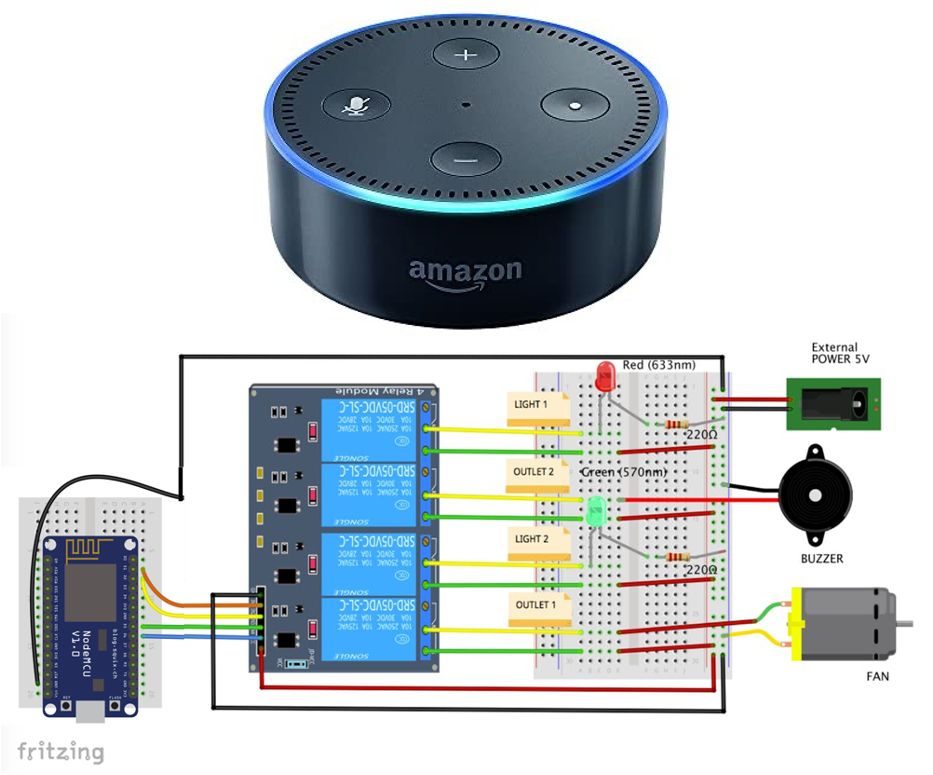
Imagine controlling your entire home with just your voice. No more fumbling for switches or apps—just say what you want, and Alexa makes it happen.
If you’ve ever wondered how to turn this convenience into a reality, you’re in the right place. This guide will show you simple, practical steps to use Alexa for home automation, making your daily life easier and more connected. Ready to transform your home into a smart haven?
Let’s dive in and unlock the full power of Alexa for your home.

Credit: www.youtube.com
Setting Up Alexa
Setting up Alexa is the first step toward transforming your home into a smart living space. It’s easier than many think, and once done, you’ll control lights, thermostats, and even your coffee maker with just your voice. Let’s walk through the simple actions that get Alexa ready to assist you.
Creating An Amazon Account
To use Alexa, you need an Amazon account. If you don’t have one, go to Amazon’s website and sign up with your email and a secure password.
Having an Amazon account links all your Alexa devices and keeps your settings, preferences, and purchases in one place. This connection is essential for accessing Alexa’s full range of features.
Downloading The Alexa App
The Alexa app is your control center. It’s available for free on both iOS and Android devices. Download and install it on your smartphone or tablet.
The app lets you manage devices, create routines, and explore skills that expand Alexa’s abilities. Don’t skip this step—it’s how you personalize your smart home experience.
Connecting Alexa To Wi-fi
Alexa needs a stable Wi-Fi connection to work properly. Open the Alexa app and follow the prompts to connect your device to your home Wi-Fi network.
Make sure your Wi-Fi signal is strong where you place your Alexa device. If you’ve ever had a dropped call or slow internet, you know how frustrating weak Wi-Fi can be. Alexa depends on a reliable connection to respond instantly.
Credit: medium.com
Voice Command Basics
Using Alexa for home automation starts with simple voice commands. Alexa listens for your instructions and acts quickly. Learning basic voice commands helps you control devices easily. You can turn lights on, adjust thermostats, and play music just by speaking.
Clear and direct commands work best with Alexa. Speaking naturally and pausing between commands improves accuracy. Alexa understands short sentences and common phrases well. Practice helps Alexa recognize your voice and preferences better.
Understanding Voice Commands
Voice commands tell Alexa what to do. Speak clearly and use simple words. Commands like “turn on the light” or “set the thermostat to 72” are easy for Alexa to follow.
Alexa responds to questions too. You can ask for the weather, news, or traffic updates. Use short commands for faster responses.
- Start with the wake word
- Give a clear command
- Wait for Alexa’s response
Alexa supports many smart home devices. Check that your devices are compatible for smooth control.
Customizing Wake Words
The wake word activates Alexa. Default wake words include “Alexa,” “Echo,” and “Computer.” You can change the wake word in the Alexa app to suit your preference.
Changing the wake word helps avoid accidental activation. It also makes Alexa more personal to your home.
- Open the Alexa app
- Go to Device Settings
- Select your Echo device
- Tap Wake Word and choose a new word
Choose a wake word that is easy to say and remember. Practice using the new wake word for best results.
Integrating Smart Devices
Integrating smart devices with Alexa makes home automation simple and efficient. Alexa acts as the central hub to control multiple gadgets using voice commands. This integration lets users manage lights, thermostats, and more from one place.
The process starts by identifying compatible devices and connecting them properly. Alexa’s ecosystem supports many brands, ensuring flexibility and choice. Smart devices become more useful when they work together under Alexa’s control.
Compatible Devices
Alexa supports a wide range of smart home devices. These include smart bulbs, plugs, cameras, locks, and thermostats. Popular brands like Philips Hue, Ring, Nest, and TP-Link work well. Users can check device compatibility in the Alexa app before buying.
- Smart lights and bulbs
- Smart thermostats
- Smart plugs and outlets
- Security cameras and doorbells
- Smart locks and sensors
Choosing devices compatible with Alexa ensures smooth setup and control. It also allows for creating routines and automations easily.
Connecting Smart Lights
Smart lights are among the easiest devices to connect with Alexa. Start by installing the smart bulbs or light strips. Use the manufacturer’s app to set them up and connect to Wi-Fi.
Next, open the Alexa app and add the device. Enable the relevant skill for the brand in Alexa. Discover new devices, and Alexa will find the lights automatically.
Once connected, control lights with voice commands like “Alexa, turn on the living room light.” Users can also dim lights or change colors through Alexa.
Smart Thermostat Integration
Smart thermostats offer convenient climate control via Alexa. Begin by installing the thermostat following the brand’s instructions. Connect it to the home Wi-Fi network.
Enable the thermostat’s skill in the Alexa app. Then, discover devices to link the thermostat to Alexa. Commands such as “Alexa, set the temperature to 72 degrees” work seamlessly.
Alexa can also monitor and adjust the thermostat based on schedules or routines. This keeps the home comfortable and energy-efficient without manual effort.
Creating Routines
Creating routines with Alexa turns your smart home into a personal assistant that anticipates your needs. Instead of controlling each device separately, routines let you combine actions triggered by a single command or event. This saves time and makes daily life smoother, allowing you to focus on what really matters.
Setting Up Daily Routines
Start by opening the Alexa app and navigating to the Routines section. Tap “Create Routine” and choose a trigger like a voice command, schedule, or device action.
Next, add actions such as turning on lights, adjusting the thermostat, or playing your favorite music. You can customize each routine to fit your lifestyle perfectly. Think about moments when you repeat tasks and how Alexa can simplify them.
Automating Morning Tasks
Imagine waking up to a gentle alarm, your blinds opening, and the coffee maker starting automatically. Alexa routines can make this your everyday reality.
Set a routine triggered by a specific time or your wake-up phrase. Include actions like reading the weather, traffic updates, or your calendar for the day. What small morning task would you automate to start your day better?
Nighttime Automation
Use Alexa routines to create a relaxing bedtime environment effortlessly. A simple command can dim your lights, lock doors, and play soothing sounds.
Schedule these actions to happen at a set time or trigger them with a “Good night” voice command. This helps you wind down faster and improve your sleep quality. Have you tried turning off distractions with a routine before bedtime?
Enhancing Security
Enhancing your home security with Alexa can give you peace of mind and control like never before. Alexa’s voice commands and smart features allow you to monitor and manage your security devices effortlessly. Let’s look at how you can strengthen your home’s safety using Alexa’s smart capabilities.
Smart Locks Integration
Connecting smart locks to Alexa allows you to lock or unlock your doors using simple voice commands. Imagine arriving home with your hands full and just saying, “Alexa, lock the front door.” It’s both convenient and secure.
Most smart locks work seamlessly with Alexa routines, so you can set your door to lock automatically at night or when you leave. You can even check the lock status through the Alexa app anytime, ensuring your home is secure even when you’re away.
Security Cameras Setup
Pairing your security cameras with Alexa lets you view live feeds on Echo Show devices or compatible smart displays. Just ask, “Alexa, show me the backyard camera,” and instantly see what’s happening.
Many cameras offer motion alerts that Alexa can notify you about. This instant feedback helps you react quickly to unexpected activity and keeps your home safer.
Privacy Settings
Security is important, but so is your privacy. Alexa provides settings to control what data is collected and when devices listen. You can mute microphones or disable cameras when you want complete privacy.
Regularly review your Alexa privacy settings to manage voice recordings and control access. This way, you keep your smart home secure while protecting your personal space.

Credit: www.youtube.com
Entertainment Features
Alexa’s entertainment features transform how you enjoy music and media at home. With just your voice, you can create the perfect atmosphere, control your TV, and manage playlists without lifting a finger. These capabilities not only add convenience but also make your entertainment setup feel smarter and more responsive to your needs.
Streaming Music
Alexa supports multiple music streaming services like Amazon Music, Spotify, and Apple Music. You can ask Alexa to play your favorite songs, artists, or genres instantly. Want background music for a dinner party or something to help you focus while working? Just say, “Alexa, play jazz music,” and enjoy the mood shift.
One useful feature is creating and managing playlists by voice. You don’t need to open an app or scroll through menus. You can also set alarms or timers with specific playlists, like waking up to your favorite tunes every morning. Have you tried asking Alexa to shuffle a playlist? It keeps your music experience fresh and surprising.
Controlling Tv And Media
Alexa can control your compatible smart TV and media devices, making it easier to navigate through shows and movies. Commands like “Alexa, turn on the TV,” or “Alexa, play the latest episode of your favorite series,” save you time and hassle. You can even ask Alexa to pause, rewind, or change the volume without reaching for the remote.
If you have devices like Fire TV or smart speakers connected to your entertainment system, Alexa becomes the central hub for your media control. You can group devices to play music in multiple rooms or switch input sources on your TV using voice commands. Do you find it easier to say “Alexa, switch to HDMI 2” rather than fiddling with remotes?
Troubleshooting Common Issues
Using Alexa for home automation is convenient, but sometimes issues pop up that can disrupt your smart home flow. Troubleshooting these common problems quickly helps you get back on track without frustration. Let’s look into some typical challenges and how you can solve them effectively.
Connection Problems
Is Alexa not responding or failing to control your devices? Connection issues are often the culprit. Start by checking your Wi-Fi network. Make sure your Alexa device and your smart home gadgets are connected to the same network.
Try restarting your router and Alexa device to refresh the connection. If your Wi-Fi signal is weak, consider moving your Alexa closer to the router or using a Wi-Fi extender. Sometimes, simply unplugging and plugging devices back in can fix minor glitches.
Have you checked the Alexa app for any error messages? The app often highlights connection problems and suggests solutions. Also, confirm that your internet service is active—without it, Alexa can’t communicate with your devices.
Device Compatibility Issues
Not all smart devices work seamlessly with Alexa. Before buying, verify your device’s compatibility with Alexa through the manufacturer’s website or the Alexa Skills store. Sometimes, a device might require a specific skill to function correctly.
If a device isn’t responding, check if its skill is enabled in the Alexa app. Also, ensure the device’s firmware is up to date. Many smart gadgets need regular updates to maintain compatibility and performance.
Have you linked your device account properly in the Alexa app? Some devices require you to sign in and authorize Alexa access. Missing this step can cause control failures, even if the device supports Alexa.
Future Trends In Home Automation
The future of home automation is unfolding rapidly, and Alexa is at the heart of this transformation. As technology grows smarter, your home will become more responsive, intuitive, and tailored to your lifestyle. Understanding upcoming trends can help you prepare your smart home for what’s next and make the most of Alexa’s evolving capabilities.
Ai In Smart Homes
Artificial intelligence is making your smart devices more intuitive and proactive. Alexa is moving beyond simple commands to anticipate your needs, like adjusting lighting based on your mood or suggesting energy-saving tips. Imagine Alexa learning your daily routine and automatically setting the perfect temperature before you arrive home.
These AI improvements mean your home won’t just react to commands but will start to understand patterns and preferences. How might your daily life change if your smart home could handle complex tasks without you lifting a finger?
Expanding Device Ecosystems
The number and variety of devices compatible with Alexa are growing every day. From smart refrigerators to security cameras and even garden sensors, the ecosystem is becoming vast and interconnected. This expansion lets you control more aspects of your home through a single Alexa interface.
As more manufacturers make their devices Alexa-friendly, you’ll find new ways to automate your home that fit your unique needs. Are there devices you wish Alexa could connect with right now to simplify your routine?
Frequently Asked Questions
How Do I Set Up Alexa For Home Automation?
To set up Alexa for home automation, first connect your smart devices to Alexa. Use the Alexa app to discover and control compatible devices. Enable relevant skills for each device brand. Follow on-screen instructions for seamless integration and voice control.
What Smart Devices Work Best With Alexa?
Alexa works best with smart lights, thermostats, plugs, cameras, and locks. Popular brands include Philips Hue, Nest, Ring, and TP-Link. Ensure your devices support Alexa compatibility for smooth operation and voice commands through Echo devices.
Can Alexa Control Home Devices Remotely?
Yes, Alexa can control devices remotely via the Alexa app. You can turn on lights, adjust thermostats, or check cameras from anywhere. Ensure your smart devices are connected to Wi-Fi and linked in the Alexa app for remote access.
Is Alexa Secure For Home Automation?
Alexa uses encryption and secure connections to protect your data. Regular updates improve security. However, always use strong passwords and review device permissions to maintain privacy in your smart home setup.
Conclusion
Using Alexa for home automation makes daily tasks easier and faster. You can control lights, locks, and appliances with simple voice commands. Setting routines helps save time and energy every day. Alexa works well with many smart devices, giving you more control.
Start small, then add more devices as you go. Enjoy a more comfortable and connected home with Alexa’s help. Simple steps lead to smarter living. Try it and see the difference it brings.






