
Are you tired of adjusting your blinds manually every day? Imagine controlling your blinds with just a tap on your phone or even your voice.
Making your blinds smart is easier than you think, and it can add comfort, convenience, and even save energy in your home. In this guide, you’ll discover simple steps to turn your regular blinds into smart ones without breaking the bank.
Ready to upgrade your space and enjoy effortless control? Keep reading to find out how you can make your blinds smart today.
Choosing The Right Smart Blinds
Choosing the right smart blinds is key for a smooth and useful upgrade. The right choice fits your needs, style, and budget. Smart blinds come in many types, each with unique features and controls. Understanding these differences helps you pick blinds that work well in your home.
Comparing Smart Blind Options
Smart blinds mainly come in motorized roller, cellular, and Venetian styles. Motorized roller blinds are simple and sleek. Cellular blinds offer great insulation and energy savings. Venetian blinds let you control light with slats. Each type has pros and cons based on your window size and room use.
Control methods vary too. Some blinds use remote controls or wall switches. Others connect to apps or voice assistants. Battery-powered blinds offer easy installation but need recharging. Wired blinds require professional setup but run without battery worries.
| Type | Control | Best For | Considerations |
|---|---|---|---|
| Motorized Roller | Remote, App, Voice | Modern rooms, large windows | Simple design, easy use |
| Cellular | App, Voice | Energy saving, insulation | Bulkier look, soft light |
| Venetian | Remote, App | Light control, style | More parts, detailed control |
Considering Compatibility With Home Systems
Smart blinds should work well with your current home setup. Check if they connect with your smart hub or voice assistant. Common systems include Alexa, Google Home, and Apple HomeKit. Integration allows easy control from one place.
Wireless standards matter. Look for Wi-Fi or Zigbee compatibility. Zigbee blinds often need a hub but use less energy. Wi-Fi blinds connect directly to your router. Choose based on your home network and device preferences.
Power source is another factor. Battery blinds work anywhere but require charging. Wired blinds need a power outlet nearby. Match the power option to your window location and installation ease.
Essential Tools And Equipment
Turning your regular blinds into smart blinds requires a few key tools and pieces of equipment. Having the right gear not only makes the installation process smoother but also ensures your smart blinds work perfectly. Let’s take a closer look at the essentials you’ll need before starting the upgrade.
Must-have Tools For Installation
Before you start, gather a few basic tools that will help you install your smart blinds quickly and safely. A cordless drill is a lifesaver for drilling holes and securing brackets without hassle. A screwdriver set is necessary for tightening screws and adjusting components during the setup.
You’ll also need a measuring tape to get precise dimensions of your window frame. This ensures the automation kit fits perfectly without any adjustments later. Don’t forget a level to keep your blinds straight and aligned.
- Cordless drill:For drilling holes and securing brackets
- Screwdriver set:To tighten screws and make adjustments
- Measuring tape:To measure window dimensions accurately
- Level:To ensure blinds are perfectly horizontal
- Wire cutters/strippers:In case your kit requires wiring
Selecting The Right Automation Kit
Choosing the perfect automation kit depends on your blinds’ type and your tech preferences. Some kits work better with roller blinds, while others fit Venetian or vertical blinds. Check compatibility before purchasing to avoid frustration.
Consider how you want to control your blinds. Do you prefer a smartphone app, remote control, or voice commands? Some kits come with built-in voice assistant compatibility, which might be a game-changer for you.
Battery-powered kits offer easy installation with no wiring, but wired kits provide more reliable power without worrying about changing batteries. Think about your window location and how often you want to maintain the system.
| Feature | Battery-Powered Kit | Wired Kit |
|---|---|---|
| Ease of Installation | High – No wiring needed | Moderate – Requires electrical connection |
| Power Source | Batteries (replace periodically) | Direct electrical power |
| Reliability | Depends on battery life | Consistent power supply |
| Control Options | App, remote, voice (varies) | App, remote, voice (varies) |
Have you thought about how you want your smart blinds to fit into your daily routine? The right kit can make all the difference between a frustrating setup and a seamless experience.
Installation Process
The installation process is where your smart blinds start to come to life. It’s not just about attaching a device; it’s about preparing your existing setup and carefully fitting new components so everything works smoothly. Let’s break down how to get your blinds ready and install the smart mechanisms step by step.
Preparing Your Blinds For Automation
First, check the type of blinds you have—roller, Venetian, or vertical. Some smart kits only work with specific types, so knowing this saves time and frustration.
Remove your blinds from the window carefully. This makes it easier to work without damaging any parts. Clean the blinds and check for any wear or damage that could affect the motor’s grip or performance.
Measure the width and length precisely. Smart blind motors often require exact sizing to fit well and operate without issues. If your blinds use cords, note their length and type, as this affects which smart motor you choose.
Step-by-step Guide To Install Smart Blinds
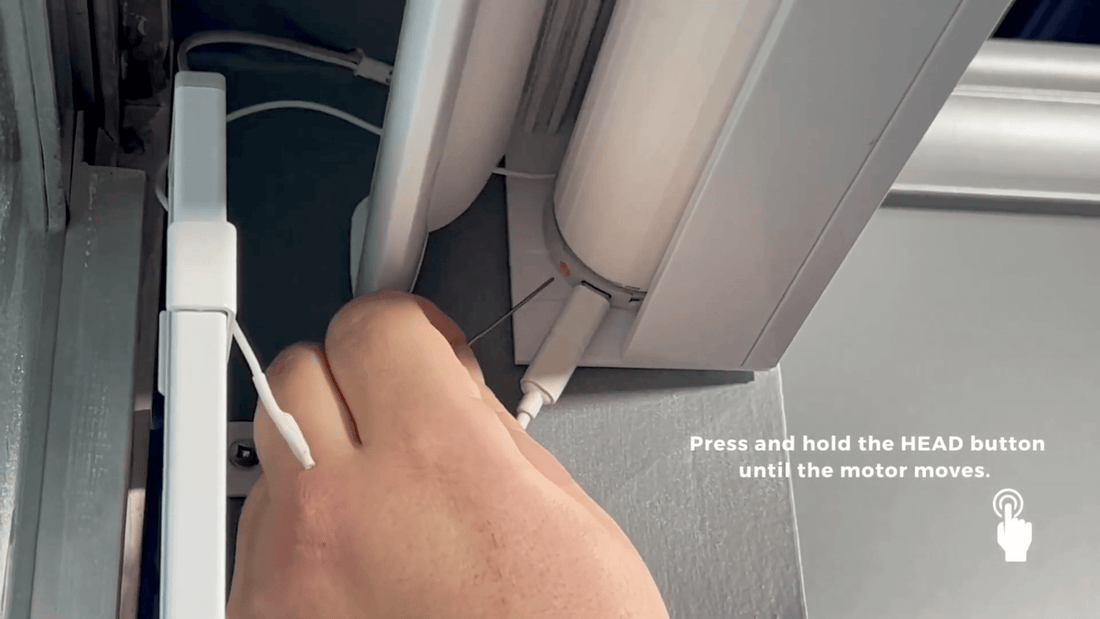
- Attach the motor:Align the smart motor with the blind’s roller or cord mechanism. Most devices come with adjustable brackets—make sure they’re firmly screwed in place.
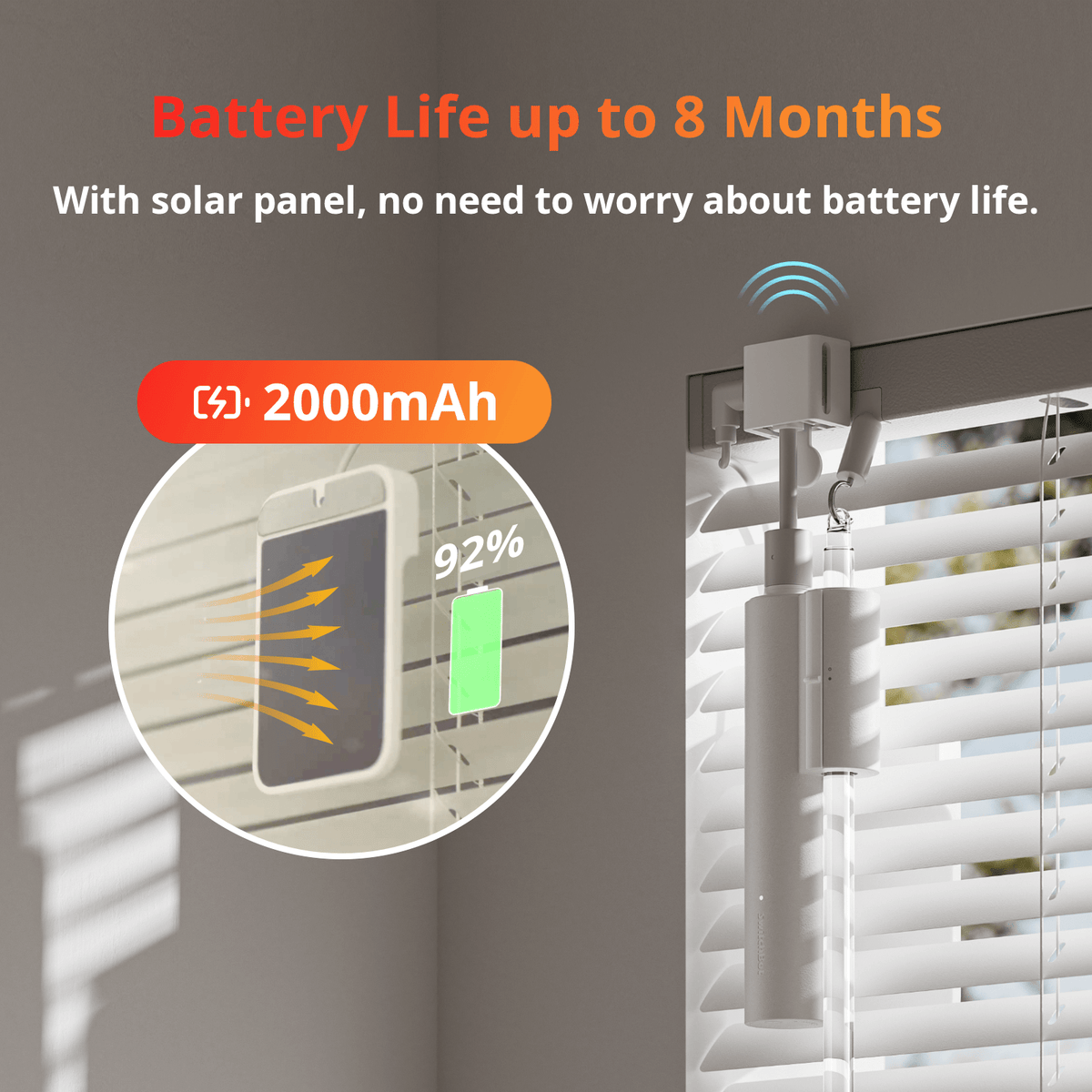
- Connect power:Some smart blinds run on batteries, while others need a power outlet. Choose a power source that fits your setup to avoid frequent recharging or complicated wiring.
- Pair with your app:Download the manufacturer’s app and follow the pairing instructions. This usually involves Bluetooth or Wi-Fi connection and setting up schedules or voice commands.
- Test the movement:Use the app to open and close the blinds. Check for smooth operation without any jerks or unusual sounds. If movement isn’t fluid, adjust the motor’s position or brackets.
- Mount the blinds back:Once everything runs smoothly, reinstall the blinds on the window. Make sure the motor doesn’t block the original mounting points.
Have you ever struggled with blinds that just wouldn’t stay in place? Adding a smart motor can solve this, but only if the installation is done right. What’s the one step you think might be most challenging in this process?
Credit: us.switch-bot.com
Connecting To Smart Home Systems
Connecting your blinds to smart home systems transforms simple window coverings into powerful tools for convenience and energy efficiency. It allows you to control your blinds with ease, whether you’re at home or away. Understanding how to link your blinds with various smart platforms will help you make the most of this technology.
Integrating With Voice Assistants
Voice control is one of the most popular ways to interact with smart blinds. If you use Alexa, Google Assistant, or Siri, you can connect your blinds to these platforms for hands-free operation.
Most smart blinds come with apps that guide you through linking to your preferred voice assistant. For example, enabling the right skill in the Alexa app can let you say, “Alexa, close the living room blinds.”
Think about the last time your hands were full. Wouldn’t it be easier to just say a command instead of fumbling with a remote or phone? This convenience is exactly why voice integration is worth setting up.
Setting Up Remote Control Access
Remote control access means you can open or close your blinds from anywhere using your smartphone. This is perfect if you forgot to close your blinds before leaving home or want to adjust them while on vacation.
Start by downloading the manufacturer’s app and connecting your blinds to your home Wi-Fi network. Once connected, you’ll have instant access to your blinds through the app interface.
Look for features like scheduling and geofencing, which can automate your blinds based on time or your location. These smart controls save energy and add security by making your home look occupied even when you’re not there.
Programming And Customization
Programming and customization turn your smart blinds from basic window covers into powerful tools that adapt to your lifestyle. This part of the process lets you tailor how your blinds behave throughout the day, improving comfort and energy efficiency. You get full control, making your smart blinds work exactly the way you want.
Creating Automation Routines
Automation routines let your blinds operate without manual input. You can set them to open with your morning alarm or close automatically at sunset. Think about your daily habits and decide when natural light or privacy matters most.
Most smart blind systems use apps where you can:
- Schedule specific times for blinds to open or close
- Link blinds to other smart devices like lights or thermostats
- Create “scenes” that adjust multiple devices with one command
Imagine your blinds lowering as your smart thermostat cools the room in the afternoon. This synergy saves energy and makes your home feel more comfortable. What routines would make your day easier?
Adjusting Settings For Optimal Use
Fine-tuning settings ensures your blinds respond perfectly to your environment. Adjust sensitivity to light or temperature so blinds react only when you want them to. You can also set motor speed for quieter or faster movement depending on your preference.
Many apps offer options to customize:
- Response delay times to avoid constant adjustments
- Limits on how far blinds open or close for privacy control
- Manual override options to take control anytime
During summer, you might want your blinds to close earlier to block heat. In winter, opening them wider during the day can bring in warmth. How often do you find yourself adjusting blinds manually? Custom settings can save you that hassle.
Credit: gosmartblinds.com
Troubleshooting Common Issues
Smart blinds can make your home more comfortable and energy-efficient. But like any tech gadget, they sometimes face hiccups. Knowing how to troubleshoot common problems helps you get your blinds working smoothly without waiting for professional help.
Fixing Connectivity Problems
If your smart blinds won’t respond, the first thing to check is the Wi-Fi connection. Make sure your router is on and has a strong signal where the blinds are installed.
Try rebooting your router and the smart blind controller. Often, this simple step clears up connection glitches.
Check if your smart home app is up to date. Sometimes, outdated software causes communication issues between your phone and the blinds.
Have you considered interference from other devices? Bluetooth or other wireless signals nearby can disrupt connectivity. Moving your router or blinds slightly might improve the signal.
Addressing Motor Malfunctions
When your blinds don’t move smoothly or stop midway, the motor might be the culprit. Start by inspecting the power source—weak batteries or loose wires can cause motor failure.
Listen for unusual sounds like grinding or clicking. These noises often signal mechanical problems inside the motor or tracks.
Try manually moving the blinds gently to check for physical obstructions. Dust or debris in the tracks can block motor movement.
If your motor has a reset option, use it to clear any error states. This can restore normal function without replacing parts.
Have you noticed the motor overheating? Giving it time to cool down can prevent permanent damage.
Benefits Of Smart Blinds
Smart blinds offer more than just convenience—they bring real benefits that can improve your daily life and home environment. By upgrading your window coverings, you gain control and efficiency that traditional blinds simply can’t match. Let’s look at how smart blinds can help save energy and boost your home’s security.
Energy Efficiency Advantages
Smart blinds help you manage sunlight and heat effortlessly, which can lower your energy bills. They can automatically close during the hottest part of the day to keep your home cooler or open in the morning to let natural warmth in. This reduces the need for air conditioning or heating.
Imagine waking up to blinds that open just as the sun rises, warming your room naturally. You save on electricity without lifting a finger. Plus, smart blinds can adjust based on your schedule or even the weather, making energy savings consistent and hassle-free.
Enhancing Home Security
Smart blinds can make your home look occupied even when you’re away. You can schedule them to open and close at different times, giving the appearance that someone is home. This simple trick can deter potential intruders.
Many smart blinds can integrate with your home security system or smart home hub. You get alerts if the blinds are moved unexpectedly, adding another layer of protection. Wouldn’t you feel more secure knowing your windows are monitored and controlled remotely?

Credit: www.hunterdouglas.com
Frequently Asked Questions
What Are Smart Blinds And How Do They Work?
Smart blinds are motorized window coverings controlled remotely. They use Wi-Fi or Bluetooth to open and close. You can schedule or adjust them via apps or voice assistants for convenience and energy savings.
Can I Make My Existing Blinds Smart?
Yes, you can retrofit existing blinds using smart motor kits. These kits attach to your current blinds and connect to smart home systems. This allows remote control without replacing the entire window treatment.
Which Devices Control Smart Blinds?
Smart blinds can be controlled via smartphone apps, smart hubs, or voice assistants like Alexa, Google Assistant, and Siri. These devices offer hands-free operation and easy scheduling for your blinds.
Are Smart Blinds Compatible With All Window Types?
Most smart blinds work with standard window sizes and types. However, some complex or custom windows may need specialized solutions. Always check compatibility before purchasing smart blind kits.
Conclusion
Making your blinds smart brings ease and comfort to your home. You control light and privacy with just a tap. Smart blinds save energy and help keep rooms cool or warm. Installation is simple and fits most blinds. Small changes can make a big difference in daily life.
Start with basic options and add features over time. Enjoy the convenience and modern touch smart blinds provide. Your home becomes more connected and efficient. Give your space a fresh, smart update today.






