
Are you worried about the safety of your home or business? Installing security cameras can give you peace of mind by keeping an eye on what matters most.
But how do you get started without feeling overwhelmed? This guide will walk you through simple, clear steps to set up your security cameras quickly and effectively. By the end, you’ll know exactly how to protect your property and monitor it from anywhere.
Ready to take control of your security? Let’s dive in.
Choosing The Right Security Camera
Choosing the right security camera ensures clear images and reliable performance. Proper placement and connection are key to effective installation. Simple tools and careful planning make the process easier and more efficient.
Choosing the right security camera is crucial for effective surveillance. The right choice ensures your property is well-monitored and secure. Different types of cameras offer varying features and benefits. Selecting the right one depends on several factors like location, budget, and specific needs. Understanding these factors helps make an informed decision.Types Of Security Cameras
Security cameras come in many forms. Dome cameras blend in well with surroundings. Bullet cameras stand out and deter intruders. PTZ cameras allow remote control of viewing angles. Each type suits different environments and security needs.Key Features To Consider
Resolution is vital for clear images. High-definition cameras capture finer details. Night vision is crucial for low-light areas. Motion detection alerts you to movement. Wireless connectivity offers easy installation and flexibility. Weatherproof models are best for outdoor use.Budget And Brand Options
Set a budget before shopping for cameras. Prices range based on features and quality. Many brands offer reliable options. Some popular brands include Nest, Arlo, and Hikvision. Compare features and reviews for the best choice within your budget.Preparing For Installation
Preparing for the installation of security cameras sets the foundation for a successful and efficient setup. Taking the time to plan each detail helps avoid common pitfalls like poor coverage or connectivity issues. Let’s focus on how you can get ready by selecting the best camera spots, ensuring power and network access, and gathering all the tools you’ll need.
Selecting Camera Locations
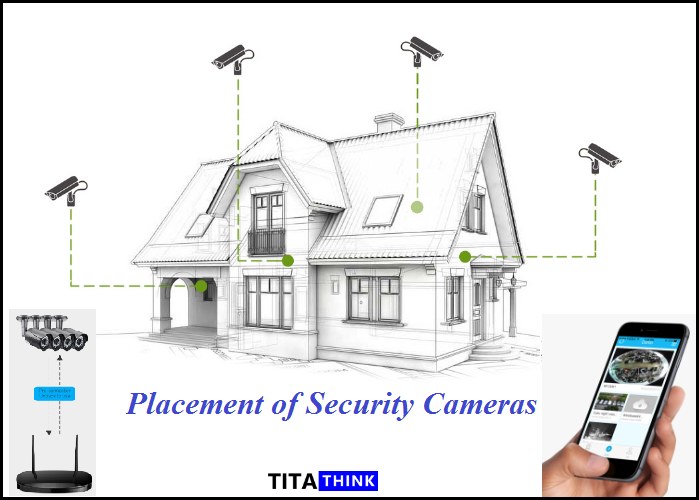
Choosing where to place your cameras is crucial. Think about the areas you want to monitor the most, such as entrances, driveways, or backyards. Avoid placing cameras where sunlight or streetlights might cause glare, making footage less clear.
Consider height and angle to capture the best view without leaving blind spots. Have you noticed how some cameras miss key areas because they’re placed too low or too close? Position them where they can cover wide spaces but remain out of easy reach to prevent tampering.
Checking Power And Connectivity
Security cameras need a reliable power source and stable connectivity to work properly. Check if your chosen locations are near electrical outlets or if you’ll need to run new wiring. For wireless cameras, make sure the Wi-Fi signal is strong enough to maintain a constant connection.
Test your network speed and stability beforehand; interruptions can cause gaps in your recordings. Have you ever had a camera feed freeze or drop unexpectedly? Ensuring solid power and internet setup reduces frustration and keeps your system running smoothly.
Gathering Tools And Equipment
Having the right tools ready before you start saves time and stress. Common tools include a drill, screwdrivers, ladder, and cable clips. Don’t forget safety gear like gloves and goggles if you’re working at heights or with electrical components.
Check your camera kit for all included parts such as mounting brackets, screws, and power adapters. Missing equipment halfway through installation can slow you down or force you to make multiple trips to the store.
Step-by-step Installation Guide
Installing security cameras might seem complicated, but breaking it down into clear steps makes the process manageable. By focusing on mounting, wiring, and network connection, you can ensure your system works smoothly and keeps your property safe. Let’s dive into each part with practical tips and real-world insights.
Mounting The Cameras
Choose a location that covers the most critical areas without obstructions. High corners often provide the best view and protect cameras from tampering.
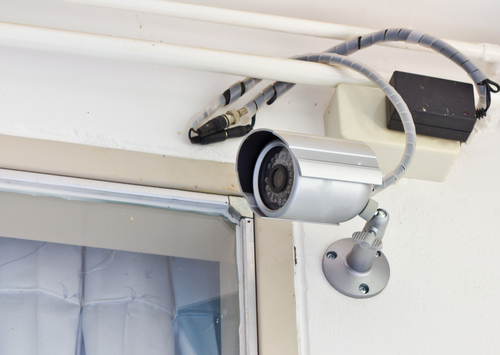
Use a sturdy drill and screws to secure the mounting bracket firmly to the wall or ceiling. Keep the camera angle adjustable so you can fine-tune the field of vision after installation.
Think about lighting conditions too—too much direct sunlight can cause glare. I once positioned a camera where the morning sun blinded the lens, so don’t hesitate to test angles during different times of day.
Wiring And Power Setup
If your cameras are wired, plan the cable route carefully to avoid exposed wires. Running cables through walls or along baseboards keeps them hidden and safe from damage.
Use cable clips or conduits to hold wires in place neatly. For power, ensure your outlets can handle the load or consider using a dedicated power supply.
Wireless cameras may still require power cables, so don’t underestimate the need for good cable management. Ask yourself: is the power source close enough to avoid long, messy cables?
Connecting To Network
Most modern cameras connect via Wi-Fi or Ethernet. For Wi-Fi, ensure your signal strength is strong at the camera location to prevent dropouts.
Ethernet connections provide more reliability but require running cables, which might need more effort during installation.
Follow your camera’s app or software instructions carefully to add the device to your network. A stable connection is key—test live video after setup to confirm everything works.
Credit: medium.com
Configuring Camera Settings
Configuring your security camera settings is key to getting the most out of your surveillance system. Proper setup ensures clear visuals, accurate motion detection, and timely alerts. Let’s break down how to adjust these settings effectively to match your security needs.
Adjusting Angles And Focus
Start by positioning your camera at the right angle to cover the desired area. Tilt and pan controls often let you fine-tune the view, so you don’t miss critical spots like entryways or blind corners.
Next, adjust the focus to sharpen the image. A clear picture helps you identify faces or objects, which is crucial for security. Don’t hesitate to test different angles and focus settings during different times of the day to ensure consistent clarity.
Setting Motion Detection
Motion detection can be a game-changer if set up correctly. Narrow down the detection zones to avoid false alarms from irrelevant areas such as busy streets or trees swaying in the wind.
Adjust sensitivity levels so the camera reacts to meaningful movement without overwhelming you with notifications. Have you ever been annoyed by constant alerts? Tweaking this feature reduces that frustration and keeps your attention on real threats.
Configuring Alerts And Notifications
Alerts are your eyes when you’re away. Choose how and when you want to receive notifications—via email, app push notifications, or even text messages.
Customize alert schedules to avoid interruptions during times when you expect normal activity, like when you’re home. This way, you only get notified when it truly matters. What’s your preferred way to stay informed about your home’s security?
Testing And Maintenance
Testing and maintenance are key to keeping your security cameras working well. These actions help catch problems early and ensure clear video footage. Regular checks can save money by avoiding costly repairs later.
Simple steps can keep your system reliable and your property safe. Follow these tips to maintain your cameras and fix common issues quickly.
Verifying Camera Functionality
Start by checking if each camera shows a clear image. View the live feed on your monitor or app. Ensure the camera angle covers the desired area fully.
Test night vision by turning off lights in the room. Confirm motion detection alerts work by moving in front of the camera. Listen for unusual sounds from the camera housing that may indicate damage.
Regular Maintenance Tips
- Clean lenses with a soft, dry cloth to avoid blurry images.
- Inspect cables and connections for wear or looseness.
- Remove dust and spider webs around the camera housing.
- Check mounting brackets to keep cameras stable and secure.
- Update firmware regularly to improve performance and security.
- Restart cameras occasionally to refresh their system.
Troubleshooting Common Issues
If the camera feed is missing, check power and network connections first. Reset the camera if it does not respond. Replace damaged cables promptly to maintain signal quality.
Blurry images may need lens cleaning or focus adjustment. Motion alerts not working could require recalibrating sensitivity or angle. Consult the user manual for specific error codes and fixes.
Credit: www.sg-cctv.com
Enhancing Home Security
Enhancing your home security goes beyond simply installing cameras. It’s about creating a comprehensive system that works seamlessly to protect your property and loved ones. Adding smart features and extra security measures can make a big difference in how effectively your security cameras keep you safe.
Integrating With Smart Home Systems
Connecting your security cameras to a smart home system allows you to monitor your home from anywhere using your smartphone or tablet. You can receive instant alerts if the cameras detect unusual activity, giving you peace of mind even when you’re away.
Many smart home hubs support voice assistants like Alexa or Google Assistant, so you can control your cameras hands-free. Imagine asking your voice assistant to show the front door camera feed while cooking dinner. This convenience makes staying vigilant easier than ever.
Have you checked if your existing smart devices can sync with your new cameras? Compatibility can save you time and prevent frustration during setup.
Adding Additional Security Measures
Security cameras work best when combined with other safety features. Adding motion sensor lights around entry points can deter potential intruders by illuminating dark areas when movement is detected.
Consider installing window and door sensors that alert you if someone tries to force entry. These sensors complement your cameras by providing immediate notifications of a breach, even before the camera captures footage.
- Use reinforced locks on doors and windows
- Trim shrubs and bushes that could hide intruders
- Post visible signs indicating your property is monitored
Think about what areas of your home feel most vulnerable. Adding extra layers of protection there can prevent break-ins and increase your overall security system’s effectiveness.

Credit: www.guardiansecurity.co
Frequently Asked Questions
How Do I Choose The Best Security Camera?
Select cameras based on resolution, field of view, and night vision. Consider wired vs. wireless options and compatibility with your system.
Where Should I Install Security Cameras At Home?
Place cameras at entry points, driveways, and common areas. Ensure clear sightlines and avoid obstructed or hidden spots for optimal coverage.
Can I Install Security Cameras Myself?
Yes, many security cameras come with DIY installation guides. Follow instructions carefully and use proper tools for a secure setup.
What Tools Are Needed To Install Security Cameras?
Basic tools include a drill, screwdriver, ladder, and cable clips. Some cameras may require additional equipment like a power tester.
Conclusion
Installing security cameras helps protect your home and family. Follow each step carefully for best results. Choose good spots that cover all important areas. Test your cameras to make sure they work well. Regular checks keep your system running smoothly.
A well-installed camera system brings peace of mind. Stay safe and keep an eye on what matters most. Simple actions can make a big difference in security. Start today to create a safer place for everyone.






