
Imagine walking into your home, and everything just works—lights adjust to your mood, your favorite music plays softly, the temperature is perfect, and security systems keep you safe without you lifting a finger. Sounds like a dream, right?
But what if you could make this your everyday reality? You don’t need to be a tech expert or spend a fortune to fully automate your home. You’ll discover simple, practical steps to transform your living space into a smart, effortless sanctuary.
Ready to take control of your comfort and convenience like never before? Keep reading, because your fully automated home is closer than you think.
Choosing The Right Smart Devices
Choosing the right smart devices sets the foundation for a seamless home automation experience. It goes beyond just picking popular gadgets—you need to consider what truly fits your daily life and tech ecosystem. The right choices can save you time, reduce frustration, and make your home genuinely smarter.
Identifying Essential Gadgets
Start by listing the tasks you want to simplify. Do you want to control lighting, manage security, or automate temperature? Focusing on your priorities helps avoid buying devices you’ll rarely use.
Think about your daily routines. Smart lights and plugs can make a big difference in comfort and energy savings. A smart thermostat can reduce bills and keep your home cozy without manual adjustments.
Security devices like smart cameras or door locks add peace of mind. Choose gadgets that address your most frequent needs first, then expand as you grow more comfortable with the system.
Compatibility Considerations
Not all smart devices play well together. Check if your chosen gadgets support the same platforms, like Google Home, Amazon Alexa, or Apple HomeKit. Mixing incompatible devices can lead to headaches and limited functionality.
Look for devices that use common communication standards such as Wi-Fi, Zigbee, or Z-Wave. This ensures smoother integration and better control from a single app or voice assistant.
Ask yourself: do you want a system controlled mostly by voice, smartphone, or automated triggers? Your answer should guide your compatibility choices to avoid juggling multiple apps.
Budget-friendly Options
Smart home automation doesn’t have to break the bank. Many affordable devices deliver solid performance without premium prices. Identify which features matter most and seek budget models that cover those needs.
Consider starter kits that bundle several devices at a discount. These kits often include hubs, sensors, and smart plugs, giving you a complete setup with less hassle.
Look for sales or refurbished items from reputable brands to stretch your budget further. Sometimes, spending a little extra upfront saves money later by avoiding replacement or compatibility issues.

Credit: www.atss.in
Integrating Home Automation Systems
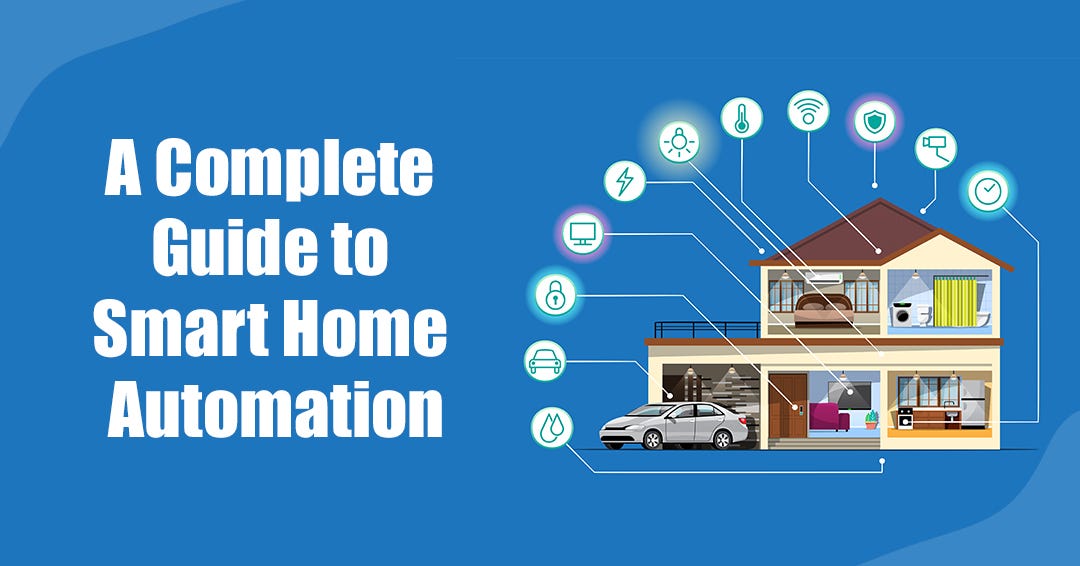
Integrating home automation systems creates a unified smart home experience. It allows different devices to work together smoothly. This integration simplifies control and boosts convenience.
Setting Up A Central Hub
A central hub acts as the brain of your smart home. It connects and controls all your devices in one place. Choose a hub compatible with many brands for flexibility. Place it where Wi-Fi signals are strong. This setup ensures all devices respond quickly and reliably.
Connecting Devices Seamlessly
Devices must communicate without interruptions. Use Wi-Fi, Zigbee, or Z-Wave protocols for stable connections. Pair devices following the hub’s instructions carefully. Group similar devices by room or function for easy management. Test connections regularly to avoid delays or failures.
Utilizing Voice Assistants
Voice assistants add hands-free control to your smart home. Popular options include Alexa, Google Assistant, and Siri. Link your hub and devices to a voice assistant app. Use simple commands to control lights, locks, and more. Voice control makes daily tasks quicker and easier.
Enhancing Security With Automation
Enhancing security with home automation provides peace of mind. Automated systems protect your home day and night without constant effort. They respond instantly to threats and keep you informed at all times.
Smart Locks And Cameras
Smart locks let you control who enters your home remotely. You can lock or unlock doors using a smartphone app. Cameras capture clear video footage of your property. Some models offer night vision and two-way audio. They help monitor entrances and spot unusual activity quickly.
Motion Sensors And Alerts
Motion sensors detect movement inside and outside your home. They trigger alarms or send notifications to your phone. Sensors can cover large areas or specific spots like windows. Alerts help you react immediately to potential intruders. They also reduce false alarms by filtering pets and other harmless movements.
Remote Monitoring Solutions
Remote monitoring lets you watch your home from anywhere. Use apps to view live feeds and check device status. Some systems include cloud storage for video clips. You can share access with family or security services. This constant oversight strengthens your home’s defense against threats.
Energy Management And Efficiency
Managing energy effectively in your home not only cuts down bills but also reduces your environmental footprint. Automation tools let you control your energy use precisely, adapting to your lifestyle without constant manual adjustments. Imagine saving energy effortlessly while staying comfortable—this is what smart energy management offers.
Smart Thermostats
Smart thermostats learn your daily routine and adjust temperatures automatically to save energy. You don’t need to remember to turn the heat down before leaving; the system does it for you. Some models even use weather forecasts to optimize heating and cooling, reducing unnecessary energy use.
Have you noticed how often we forget to adjust the thermostat when heading out? Smart thermostats solve this by adapting in real-time, ensuring you only use energy when needed.
Automated Lighting Control
Automated lighting systems turn lights on and off based on occupancy or time of day, preventing energy waste. You can set schedules or use motion sensors so lights never stay on in empty rooms. This simple automation makes a big difference, especially in homes with many rooms.
Think about how many times you’ve left a light on by accident. Automated lighting removes that worry and lowers your electricity consumption.
Appliance Scheduling
Scheduling your appliances to run during off-peak hours saves money and eases energy demand on the grid. You can set your dishwasher, washing machine, or electric vehicle charger to operate at night when rates are lower. This helps you avoid high energy costs without changing your routine.
Have you tried setting your appliances to run automatically? It’s a practical way to cut your bills and balance energy use efficiently.
Creating A Smart Entertainment System
Creating a smart entertainment system transforms your home into a personal theater and music hub, all controlled with ease. It goes beyond just having devices; it’s about making them work together seamlessly. Imagine walking into your living room, and your favorite playlist starts, the lights dim, and your TV switches to the streaming service you want—all without lifting a finger.
Streaming Services Integration
Connecting your streaming services directly to your smart devices simplifies how you watch movies and shows. Most smart TVs and media players allow you to link accounts like Netflix, Hulu, and Disney+ for quick access. You can even use voice commands to search for content or control playback, making it easier to find exactly what you want without scrolling endlessly.
Consider setting up routines that start your preferred streaming service at a certain time or when you say a specific phrase. This level of automation saves time and keeps your entertainment options ready whenever you need them. How often do you find yourself stuck deciding what to watch? This setup helps you skip that part.
Multi-room Audio Setup
Imagine music following you from room to room without missing a beat. Multi-room audio systems let you play the same song throughout your home or different tracks in each space. Brands like Sonos and Bose offer speakers that connect wirelessly, creating a flexible and immersive sound experience.
Setting up zones is straightforward, and controlling them from your phone or voice assistant lets you adjust volume or switch tracks instantly. Think about hosting a party—wouldn’t it be great to manage all your music from one place while mingling? This feature makes it possible.
Smart Tv Features
Smart TVs today come packed with features that make your viewing experience more interactive and convenient. Voice search, personalized recommendations, and app stores are just the start. Many models also support smart home integration, allowing you to control lights, thermostats, and more, right from your TV remote.
Some TVs even include motion sensors or gesture controls, so you can pause or play without touching anything. These features reduce the clutter of multiple remotes and streamline your entertainment control. What’s one feature you wish your current TV had to make your life easier?
Automating Daily Routines
Automating daily routines brings ease and efficiency to your home life. Small tasks become effortless with smart devices working for you. Automation saves time and reduces stress. It creates a seamless flow from morning till night. Smart technology helps manage chores and personal habits without constant attention.
Morning And Evening Rituals
Start and end your day smoothly with automation. Smart lights can gradually brighten to wake you up gently. Automated coffee makers prepare your drink just before you rise. Evening routines can include dimming lights and locking doors automatically. Thermostats adjust temperatures for comfort at bedtime. Voice assistants can play relaxing sounds or read news as you prepare for sleep.
Cleaning And Maintenance Automation
Robotic vacuum cleaners keep floors tidy without effort. Automated mops handle spills and stains on schedule. Smart trash cans can notify you when they are full. Sensors detect leaks or unusual changes in water and send alerts. Air purifiers run on timers to keep air fresh daily. These tools reduce manual cleaning and upkeep tasks.
Gardening And Lawn Care
Smart irrigation systems water plants based on weather and soil needs. Automated lawn mowers keep grass trimmed regularly. Garden sensors monitor moisture and sunlight to optimize plant health. Outdoor lighting can turn on at dusk and off at dawn. These devices help maintain your garden with little input. Enjoy a green, healthy yard with minimal effort.
Troubleshooting Common Issues
Troubleshooting is part of making a smart home work smoothly. Devices may not connect well, or they might need updates. Understanding common problems helps you fix them fast. This keeps your home running without stress. Let’s explore some frequent issues and how to solve them.
Connectivity Problems
Smart devices need a strong internet connection. Weak Wi-Fi can cause delays or disconnects. Try these tips:
- Place your router in a central location.
- Reduce distance between devices and router.
- Restart your router regularly.
- Check for interference from other electronics.
- Use a Wi-Fi extender for larger homes.
Wired connections can be more stable for some devices. Use Ethernet cables where possible. Also, ensure your network password is correct on all devices.
Device Compatibility Challenges
Not all smart home devices work well together. Different brands may use different systems. Check these points to avoid trouble:
- Choose devices that support common platforms like Alexa, Google, or Apple HomeKit.
- Verify if devices use the same communication protocol (Wi-Fi, Zigbee, Z-Wave).
- Read product manuals for compatibility information.
- Use a smart home hub to connect different brands.
Compatibility issues can stop automation routines. Test devices before full setup. This saves time and frustration.
System Updates And Maintenance
Smart devices need regular updates to work well. Updates fix bugs and improve security. Follow these steps:
- Enable automatic updates if available.
- Check for updates in device apps often.
- Restart devices after updates to apply changes.
- Clear app cache to avoid slow performance.
- Keep your router firmware updated.
Maintenance keeps your system secure and efficient. Set reminders to check devices monthly. This prevents many common issues.
Credit: medium.com
Future Trends In Home Automation
The future of home automation holds exciting possibilities. Technology advances rapidly, making homes smarter and more efficient. New trends focus on ease, energy savings, and better user experience. These trends shape how people live and interact with their homes. Understanding them helps prepare for a fully automated future.
Emerging Technologies
New devices and systems improve home automation daily. Voice control grows more natural and responsive. Sensors detect activities and adjust settings automatically. Wireless power and better battery life boost device freedom. Smart mirrors, windows, and even furniture join the network. Homes become more interactive and adaptive.
Ai And Machine Learning Applications
Artificial intelligence learns habits and preferences quickly. It predicts needs, like adjusting lights before you enter. Machine learning improves security by spotting unusual behavior. AI assistants manage schedules and control appliances smoothly. The system grows smarter with each interaction. Automation becomes more personal and intuitive.
Sustainable Smart Living
Energy efficiency gains focus in home automation. Smart thermostats and lighting reduce waste and cost. Solar panels and energy storage integrate with smart systems. Water usage gets monitored and optimized automatically. Sustainable smart homes help protect the environment. They make saving resources simple and effective.
Credit: medium.com
Frequently Asked Questions
What Devices Are Essential For Home Automation?
Essential devices include smart hubs, lights, thermostats, security cameras, and voice assistants. These connect your home’s systems for seamless control and automation.
How Do I Start Automating My Home?
Begin by choosing a smart hub, then add compatible devices like lights and sensors. Integrate voice control for easier management and gradual expansion.
Is Home Automation Secure From Hacking?
Yes, if you use strong passwords, update firmware regularly, and choose reputable brands. Secure your Wi-Fi and enable two-factor authentication for added protection.
Can Home Automation Save Energy And Reduce Bills?
Absolutely. Automated lighting, thermostats, and appliances optimize energy use. Scheduling and remote control help lower consumption and reduce monthly utility costs.
Conclusion
Automating your home brings ease and comfort every day. Start with simple devices and build step-by-step. Choose tools that fit your needs and budget. Control lights, locks, and temperature from anywhere. Enjoy saving time and energy without extra effort. Keep learning and upgrading as technology grows.
Your smart home can make life smoother and safer. Small changes lead to big benefits over time. Embrace automation for a modern, relaxed lifestyle.






