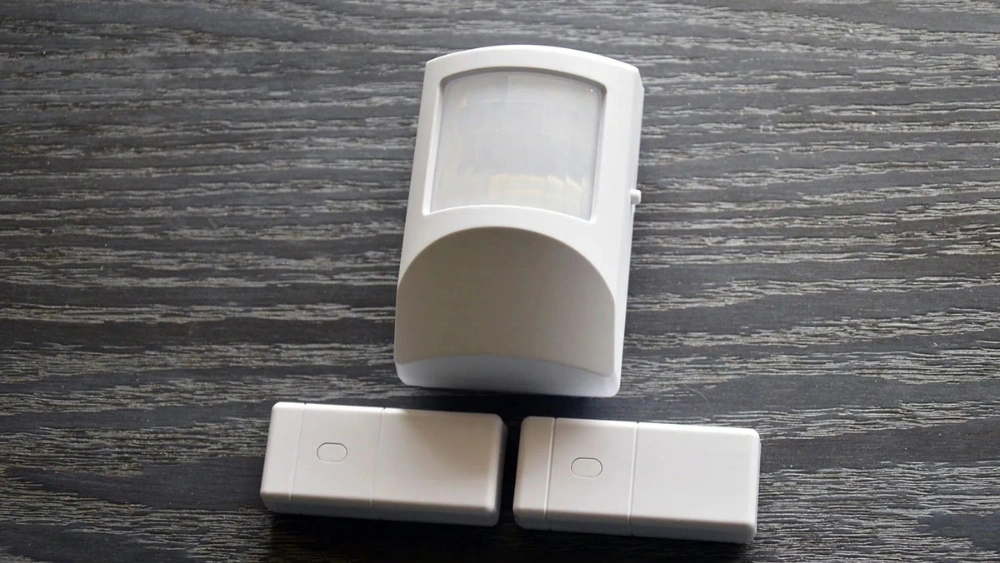
Is your motion sensor acting up or not working at all? Chances are, it’s time to change the battery.
You might think this is a tricky task, but it’s actually simple and quick once you know the right steps. In this guide, you’ll learn exactly how to change the battery in your motion sensor without any hassle. By the end, you’ll have your sensor working like new again, keeping your home or office safe and efficient.
Keep reading—you’re just a few easy steps away from solving the problem!
Tools Needed
Gather a small screwdriver, replacement battery, and cleaning cloth. Ensure you have the right size battery for your device. A flashlight might help if working in dim light.
Changing the battery in a motion sensor is simple with the right tools. This task becomes straightforward with a basic toolkit. Having the correct tools prevents damage and makes the process smooth. Below is a list of essential tools you’ll need.Phillips Head Screwdriver
A Phillips head screwdriver is crucial for removing screws from the sensor’s casing. Make sure it’s the right size to avoid stripping screws.Flathead Screwdriver
A flathead screwdriver helps pry open the sensor’s casing if it’s tightly shut. It’s useful for gently lifting the cover without causing damage.Replacement Battery
Ensure you have the correct replacement battery. Check the sensor’s manual for specifications. A fresh battery ensures optimal performance.Soft Cloth
A soft cloth is essential for cleaning the sensor’s parts. It removes dust and debris without scratching surfaces.Flashlight
A flashlight is handy for illuminating small spaces. It helps you see inside the sensor clearly, especially in dim areas.Plastic Pry Tool
A plastic pry tool is useful for opening delicate parts. It minimizes the risk of cracking or breaking plastic components.Locate The Motion Sensor
Finding your motion sensor is the first step before changing its battery. Without knowing exactly where it is, you can’t proceed safely or efficiently. Some sensors hide in plain sight, while others tuck away in corners or ceilings.
Have you ever spent time searching your entire room only to realize the sensor was above the doorway? Knowing common installation spots can save you time and frustration.
Check Near Entry Points
Motion sensors usually monitor areas where movement is most likely to occur. Look around doors, windows, and hallways. These spots give the sensor a clear view of anyone entering or leaving.
Walk around your home or office and scan these areas carefully. You might spot a small device attached to the wall or ceiling.
Look For Small, Discreet Devices
Motion sensors are often small, about the size of a smoke detector or smaller. They may be white or beige to blend with the wall or ceiling.
Don’t overlook corners where walls meet ceilings — these are popular spots. Sometimes the sensor looks like a tiny dome or a small rectangular box.
Use Your Smartphone’s Flashlight
A bright flashlight can help you spot the sensor’s reflective lens. Shine it towards suspected areas and watch for tiny glints of light.
This trick works especially well in dim rooms or during the evening. It can help you find sensors hidden in shadowed corners.
Consult The Device Manual Or App
If you kept the manual or have the product app, check them for installation details. The manual often shows diagrams or pictures of where the sensor should be located.
Apps sometimes offer a map or setup guide that points to the sensor’s exact location. This makes your search quicker and more accurate.
Ask Others In Your Space
If you share your home or office, others might know where the motion sensors are. They could have installed or maintained them before.
Simply asking can save you a lot of time and effort. Communication is often the fastest way to find hidden devices.
Power Off The Sensor
Powering off your motion sensor before changing the battery is a crucial safety step. It prevents accidental triggers and protects the device’s internal components. Taking a moment to properly shut down the sensor can save you from unexpected shocks or damage.
Locate The Power Switch Or Button
Most motion sensors have a dedicated power switch or button. Check the sides, back, or inside the battery compartment for this control. If you don’t see a switch, look for a small button labeled “Off” or a power icon.
Use The Sensor’s App Or Control Panel
Some advanced motion sensors connect to an app or home security system. You might need to turn off the sensor remotely through the app before opening it. This step helps you avoid false alarms during the battery change.
Remove The Sensor From Its Mount
In certain models, powering off involves detaching the sensor from its wall or ceiling mount. This action usually cuts off the power source directly. It’s a quick and effective way to ensure the device is completely off.
Wait Before Opening The Battery Compartment
After powering off, wait about 10-15 seconds before opening the battery cover. This pause lets the sensor fully shut down and resets any active circuits. You’ll reduce the risk of short circuits or sensor errors.
Have you ever skipped this step and faced a surprise alarm or device malfunction? Taking the time to properly power off your motion sensor makes the battery replacement smoother and safer.
Open The Sensor Cover
Opening the sensor cover is the first and often the most straightforward step when changing the battery in your motion sensor. You might find that the cover is secured in a way that’s a bit different from other devices you’ve handled. It’s important to approach this task gently to avoid damaging the sensor or its housing.
Locate The Cover Release Mechanism
Most motion sensors have a small latch, tab, or screw that holds the cover in place. Look closely around the edges of the sensor for any signs of a removable panel. Sometimes, the release mechanism is subtle—like a tiny groove where you can insert a flathead screwdriver or your fingernail.
Use The Right Tools Carefully
If your sensor cover has screws, use a screwdriver that fits perfectly to avoid stripping them. For snap-on covers, a plastic pry tool or a flathead screwdriver can help gently lift the cover without scratching the surface. Patience is key here—applying too much force can break the plastic or damage the sensor’s internal components.
Handle The Cover With Care
Once you’ve loosened or popped open the cover, handle it gently. Some covers have small hinges or connectors that can break if pulled too hard. Keeping the cover in good condition means your sensor will remain easy to open next time you need to change the battery.
Check For Hidden Fasteners Or Clips
If the cover doesn’t budge easily, pause and check for hidden screws or clips. Sometimes, manufacturers hide these fasteners under stickers or labels. Have you ever tried to force a cover open only to realize there was a hidden screw? It’s worth double-checking to save time and avoid damage.
Remove The Old Battery
Removing the old battery from a motion sensor is the first key step. This process ensures the sensor can work well with a fresh power source. Taking out the old battery carefully avoids damage to the sensor and keeps it safe for reuse.
Before starting, make sure the sensor is off or disconnected. This helps prevent any short circuits or shocks. The location of the battery may vary depending on the sensor model.
Locate The Battery Compartment
Find the battery compartment on your motion sensor. It is usually on the back or bottom side. Some covers slide off, while others need a small screwdriver to open.
Open The Battery Cover
Use your fingers or a tool to open the cover gently. Avoid using too much force to prevent breaking the cover or the sensor.
Remove The Old Battery Safely
Take out the old battery carefully by lifting it from the compartment. Note the battery’s position and orientation for correct replacement.
Dispose Of The Old Battery Properly
Do not throw the old battery in the trash. Use local battery recycling programs or hazardous waste facilities to dispose of it safely.

Credit: www.reddit.com
Select The Right Replacement Battery
Choosing the right replacement battery for your motion sensor is essential to keep it working efficiently. Picking a battery that doesn’t match can cause the sensor to fail or drain power quickly. Let’s look at how you can find the perfect battery for your device.
Check The Battery Type Recommended By The Manufacturer
Start by looking at the motion sensor’s manual or the label inside the battery compartment. It usually specifies the exact battery type needed, like AA, AAA, CR123A, or coin cell batteries.
Using the recommended type ensures compatibility and prevents damage. Have you ever tried using a different battery only to find your device won’t turn on? This is why sticking to the manufacturer’s advice matters.
Consider Battery Chemistry For Longer Life
Not all batteries are made equal. Alkaline batteries are common and cheap but might not last as long as lithium batteries in motion sensors.
Lithium batteries often perform better in extreme temperatures and offer longer life. If your sensor is outdoors or used frequently, this small upgrade can save you frequent replacements.
Verify Voltage And Size
Even if the battery type matches, the voltage and size must be exact. A slight difference can cause malfunction or damage the sensor.
Double-check the battery’s voltage rating (usually 1.5V or 3V) and physical dimensions before buying. Have you ever struggled fitting a battery only to realize it was the wrong size?
Buy Batteries From Trusted Brands
Cheap batteries can leak or have inconsistent power output. Invest in well-known brands known for reliability.
This reduces the risk of sensor damage and ensures steady performance. Your sensor deserves a battery that won’t let you down.
Insert The New Battery
Inserting the new battery into a motion sensor is a simple but important task. The right placement ensures the sensor works correctly and lasts longer. This step requires careful handling to avoid damage and to keep the device functioning well.
Before placing the battery, check the positive (+) and negative (-) ends. Align them with the sensor’s battery compartment marks. This alignment prevents power issues and helps the sensor detect motion accurately.
Prepare The Battery For Insertion
Remove the new battery from its packaging carefully. Avoid touching the terminals to prevent corrosion or damage. Hold the battery by its edges for safety and cleanliness.
Align The Battery Correctly
Look inside the battery compartment for polarity signs. Match the positive end of the battery with the positive symbol inside. Do the same for the negative end. Proper alignment ensures the sensor powers up smoothly.
Insert The Battery Gently
Place the battery into the compartment slowly. Avoid forcing it, which can break the contacts or the battery. A gentle push is enough to secure the battery in place.
Close The Battery Compartment
After inserting the battery, close the cover securely. Make sure it snaps or screws back properly. A tight fit protects the battery from dust and moisture.
Test The Sensor Function
Turn on the motion sensor to check if it works. Walk past the sensor to trigger it. If it does not respond, recheck the battery position and try again.

Credit: www.youtube.com
Close The Sensor Cover
Closing the sensor cover properly is a key step after replacing the battery in your motion sensor. It ensures the device stays protected from dust, moisture, and accidental damage. A securely closed cover also helps maintain the sensor’s sensitivity and prolongs its lifespan.
Check For Proper Alignment
Before snapping the cover back on, make sure it lines up correctly with the sensor body. Misalignment can cause the cover to not seal properly, leaving gaps that allow dirt or moisture in. Take a moment to gently adjust the cover until it fits snugly against all edges.
Secure The Cover Firmly
Press the cover evenly along its edges until you hear a click or feel it lock into place. Avoid forcing it too hard, which might crack the plastic or damage the hinges. If your sensor has screws, use a screwdriver to tighten them just enough to hold the cover securely without over-tightening.
Test The Sensor After Closing
Once the cover is closed, turn on the sensor to confirm it’s working properly. Sometimes, a loose cover can interfere with the sensor’s motion detection. Walking in front of the sensor or waving your hand can quickly verify if the device is active and responsive.
Power On And Test
After replacing the battery in your motion sensor, powering it on and testing it is crucial. This step confirms that the new battery is installed correctly and that the sensor is functioning as expected. Skipping this step can leave you wondering if the problem was truly fixed or if the sensor needs further attention.
Power On Your Motion Sensor
Start by placing the sensor back into its mounting or housing if you removed it. Most motion sensors have a small switch or simply power on automatically when the battery is inserted. Make sure the sensor is positioned correctly so it can detect movement as intended.
If your sensor has an indicator light, watch for it to turn on or blink, signaling the device has power. If nothing happens, double-check the battery orientation or try a fresh battery. Have you ever felt frustrated by a device that won’t power on after a battery change? This is often due to simple mistakes like incorrect placement.
Test The Motion Sensor’s Functionality
To confirm your sensor works, create movement within its detection range. Walk in front of it or wave your hand to trigger the sensor. Many sensors have a visual indicator or an audible beep to show they detected motion.
Observe how quickly the sensor responds. A delayed or no reaction might mean the sensor still has issues, or the battery isn’t making a good connection. Try adjusting the sensor’s angle or distance to see if that improves performance.
Troubleshoot Common Issues During Testing
- No power indicator:Recheck battery placement and try cleaning the contacts with a dry cloth.
- Sensor doesn’t detect motion:Ensure the sensor is not obstructed and is within the recommended range.
- False alarms or constant triggering:Adjust sensitivity settings if available or reposition the sensor away from heat sources or moving objects like curtains.
Have you tested your sensor’s response immediately after changing the battery? Catching problems early saves time and prevents unnecessary replacements.

Credit: linkdhome.com
Troubleshooting Common Issues
Troubleshooting common issues after changing the battery in a motion sensor can save time and frustration. Problems may arise even after a new battery is installed. Understanding simple fixes helps maintain sensor performance.
Check the sensor carefully. Some issues are easy to resolve with a few quick steps. This section covers frequent problems and solutions.
Sensor Not Turning On
Ensure the battery is inserted correctly. Polarity matters; the plus and minus signs must match. Clean the battery contacts with a dry cloth to remove dirt or corrosion. Check for a power switch and make sure it is on. Test with a fresh battery to rule out a dead cell. Reset the sensor by removing the battery for a minute, then reinsert it.
False Alarms After Battery Change
False alarms can occur if the sensor is not properly calibrated. Allow the sensor a few minutes to adjust after installing the new battery. Avoid placing the sensor near heat sources, fans, or windows. Check for pets or moving objects in the detection area. Clean the sensor lens gently to remove dust or spider webs. Reposition the sensor if false alarms continue.
Battery Draining Quickly
Check the battery type; use the recommended brand and voltage. Avoid mixing old and new batteries. Inspect the sensor for damage or moisture inside the casing. Turn off unnecessary features like sensitivity or night mode if possible. Ensure the sensor is not triggered too often by nearby motion. Replace the sensor if battery drain persists despite these steps.
Tips For Battery Maintenance
Maintaining the battery in your motion sensor is key to keeping your security system reliable and hassle-free. Good battery care can extend the life of your sensor and prevent unexpected outages. Let’s look at some practical tips that make battery maintenance simple and effective.
Optimal Battery Storage
Store batteries in a cool, dry place away from direct sunlight. Heat can drain battery power quickly, even when not in use. I once kept spare batteries in a warm spot and found they lost charge faster than expected—don’t let this happen to you.
Keep batteries in their original packaging until you need them. This prevents accidental discharge and protects contacts. Avoid storing batteries loosely in a drawer where they might touch metal objects and short-circuit.
Regular Testing Schedule
Test your motion sensor batteries at least once every three months. Use a simple battery tester or check the sensor’s status light if it has one. This small habit helps catch weak batteries before they cause sensor failure.
Set reminders on your phone to keep this schedule consistent. Have you ever been caught off guard by a dead battery? Regular checks can save you from that surprise.
Choosing Long-lasting Batteries
Opt for high-quality alkaline or lithium batteries known for longer life. Lithium batteries tend to perform better in extreme temperatures and last significantly longer than standard alkaline ones.
- Consider rechargeable batteries if you want an eco-friendly and cost-effective option.
- Check the sensor’s manual for recommended battery types to ensure compatibility.
Choosing the right battery can reduce how often you need to change it, making your life easier. Which battery type fits your lifestyle best?
Frequently Asked Questions
How Do I Open A Motion Sensor To Replace The Battery?
Locate the sensor cover, usually secured by clips or screws. Gently remove the cover to access the battery compartment. Use a small screwdriver if needed. Handle the sensor carefully to avoid damage. Replace the battery as instructed.
What Type Of Battery Does A Motion Sensor Use?
Most motion sensors use AA, AAA, or CR123A lithium batteries. Check your sensor’s manual or inside the battery compartment for specifics. Using the correct battery ensures optimal sensor performance and longevity.
How Often Should I Change The Motion Sensor Battery?
Battery life depends on usage but typically lasts 6 to 12 months. Replace batteries immediately if the sensor shows weak performance or warning signals. Regular checks help maintain reliable motion detection.
Can I Replace The Battery Without Removing The Sensor?
No, you usually need to remove or open the sensor housing to access the battery. Attempting to replace without proper access may damage the device or void warranties.
Conclusion
Changing the battery in your motion sensor is simple and quick. Regular battery checks keep your sensor working well. Always use the right battery type for best results. Proper care extends your sensor’s life and performance. Now, you can enjoy reliable motion detection without worry.
Stay safe and keep your home protected with ease.






