
Imagine never fumbling for your keys again or worrying if you locked the door behind you. A smart lock can make that possible.
But how does a smart lock work, and what makes it different from your regular lock? If you’ve ever wondered how to boost your home’s security while adding convenience, this article is for you. Keep reading to discover the simple technology behind smart locks and why they might be the perfect upgrade for your door.

Credit: doorsforpros.com
Keyless Entry Basics
Keyless entry is transforming the way we secure our homes, providing convenience and peace of mind. Imagine arriving home with your hands full, and instead of fumbling for keys, you simply tap your phone or enter a code to unlock the door. Smart locks offer this seamless experience, making traditional keys a thing of the past. They utilize advanced technology to ensure security without the hassle of keys, giving you more control over who enters your home.
Types Of Smart Locks
Smart locks come in various styles to suit different preferences and needs. You can choose from:
- Bluetooth Locks:These connect directly to your smartphone through Bluetooth. They work best when you’re within close proximity to the door.
- Wi-Fi Locks:Ideal for remote access, Wi-Fi locks allow you to control your lock from anywhere with an internet connection.
- Biometric Locks:Equipped with fingerprint scanners, these locks offer high security and eliminate the need for codes or devices.
Each type has its unique advantages, depending on how you prefer to manage access to your home.
Core Components
Understanding the core components of smart locks can help you make an informed choice. Here’s what you need to know:
- Lock Mechanism:This is the physical part that secures the door. Smart locks can retrofit existing deadbolts or replace them entirely.
- Connectivity Module:This element connects the lock to your smartphone or network, enabling remote access and control.
- User Interface:From touchscreen keypads to mobile apps, the interface is how you interact with the lock.
With these components working together, smart locks provide not only security but also a user-friendly experience.
Have you ever considered how smart technology could change your daily routines? With smart locks, the hassle of lost keys and lockouts becomes a thing of the past, offering convenience and security in one sleek package.
Connectivity Options
Smart locks connect your door to your digital world in different ways. These connectivity options impact how you control access and monitor your home. Understanding these options helps you pick the best smart lock for your needs.
Bluetooth Locks
Bluetooth locks connect directly to your smartphone within a short range, usually about 30 feet. This means you unlock your door by simply approaching it with your phone in hand—no internet needed.
These locks work best if you want secure, quick access without relying on Wi-Fi. Have you ever struggled with spotty Wi-Fi near your door? Bluetooth locks keep things simple and reliable in those spots.
Wi-fi Enabled Locks
Wi-Fi locks link to your home network, letting you control your door from anywhere using an app. You can lock or unlock remotely, check access logs, and even grant temporary keys to guests.
This remote control is great when you’re away but need to let in a friend or service person. Just remember, Wi-Fi locks depend on your internet’s stability. What happens if your Wi-Fi goes down? Some models include backup options like physical keys or Bluetooth.
Zigbee And Z-wave
Zigbee and Z-Wave are wireless protocols designed for smart home devices, including locks. They create a mesh network, where each device passes signals to others, improving range and reliability.
If you already have a smart home hub, these locks integrate smoothly and reduce Wi-Fi traffic. Do you have multiple smart devices? Adding a Zigbee or Z-Wave lock can make your whole system work better together.
Authentication Methods
Smart locks use different ways to check who is trying to enter. These ways are called authentication methods. They keep your home safe by making sure only allowed people get in. Each method offers a unique way to open the lock without a traditional key.
Pin Codes And Keypads
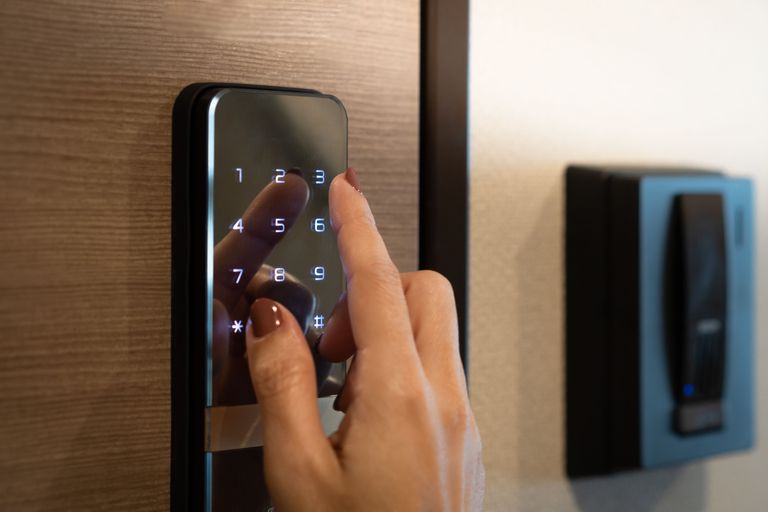
Many smart locks use PIN codes entered on a keypad. You type a secret number to open the door. This method is simple and does not require carrying a key. Some locks let you create multiple codes for different people. You can change or delete codes anytime for better security.
Biometric Access
Biometric access uses unique body features to open the lock. Fingerprint scanners are common in smart locks. They read the ridges on your finger to verify your identity. Some locks use facial recognition or iris scans. This method is fast and hard to fake, increasing safety.
Mobile App Control
Many smart locks connect to a smartphone app. You can lock or unlock the door using the app. The app communicates with the lock via Bluetooth or Wi-Fi. It often sends alerts when the door is opened. Some apps allow temporary access for guests remotely.
Installation Process
Installing a smart lock can feel intimidating at first, but understanding the process helps you feel more confident. It’s not just about fitting a new gadget; it’s about making sure your door and lock communicate smoothly. Let’s break down what you need to know before you start and how to set up your smart lock effectively.
Compatibility With Doors
Not every door will work with every smart lock. You need to check your door’s thickness, material, and existing lock type. Most smart locks fit standard door thicknesses, typically between 1 3/8 inches and 2 inches.
Consider the lock type you currently have installed—deadbolts are usually compatible with smart locks, but knob locks might need a different approach. If your door is made of metal or has an unusual shape, compatibility might become tricky.
Ask yourself: Does your door have enough space around the lock for the smart lock’s components? If not, you might need to adjust or choose a different model.
Step-by-step Setup
- Remove your existing deadbolt:Start by unscrewing and taking out the old lock from both sides of the door.
- Check the new lock parts:Lay out all components to familiarize yourself with the pieces, including the keypad, interior unit, batteries, and mounting hardware.
- Install the mounting plate:Attach the provided mounting plate securely to the door where the old deadbolt was.
- Attach the smart lock:Align the smart lock’s exterior and interior parts, then secure them together with screws.
- Insert batteries:Power your smart lock by adding batteries, usually AA or rechargeable types.
- Set up the lock’s software:Download the manufacturer’s app and connect your lock via Bluetooth or Wi-Fi to configure settings.
- Test the lock:Try locking and unlocking using the keypad, app, or voice commands to ensure everything works smoothly.
During my installation, I realized how crucial it is to follow the instructions closely. Skipping a step can cause the lock to misalign, preventing smooth operation. Have you thought about how you’ll handle troubleshooting if your lock doesn’t work right away?
Security Features
Smart locks offer advanced security features to protect your home. These features help keep your property safe and give you peace of mind. Below are some key security aspects built into smart locks.
Encryption Standards
Smart locks use strong encryption to protect data. Encryption scrambles your information during wireless communication. This prevents hackers from reading or stealing your access codes. Most smart locks use AES 128-bit or 256-bit encryption. These are the same standards banks and governments use. Encryption ensures only authorized devices can control the lock.
Tamper Alerts
Many smart locks send alerts if someone tries to break in. Sensors detect forced entry or physical tampering. You get instant notifications on your phone. This helps you act quickly in case of a security breach. Some locks also have built-in alarms that sound when tampering occurs. Tamper alerts add a layer of protection beyond traditional locks.
Auto-lock Functions
Auto-lock automatically secures the door after a set time. It reduces the chance of leaving the door unlocked by mistake. You can set auto-lock to trigger after a few seconds or minutes. Some locks use geofencing to lock when you leave the area. This feature keeps your home secure without extra effort.
Credit: libertyplus.libertymutual.com
Power And Battery Life
Power and battery life are key factors for smart locks. These devices rely on batteries to stay active and secure your home. Understanding battery types, low power warnings, and backup options helps ensure your lock works without interruption. Let’s explore these aspects to keep your smart lock powered and reliable.
Battery Types
Smart locks use different battery types. Most models run on AA or AAA alkaline batteries. Some use rechargeable lithium-ion batteries. Battery life varies by type and usage. Alkaline batteries can last several months. Rechargeable batteries need regular charging but reduce waste. Choose the type that fits your lifestyle and lock model.
Low Power Warnings
Smart locks alert you before batteries run out. These warnings appear through apps or LED lights on the lock. Early alerts give time to replace or recharge batteries. Ignoring warnings can cause lock failure. Pay attention to these signals to avoid lockouts.
Backup Options
Backup options protect access during power loss. Many smart locks have physical keys as backups. Some allow external battery packs to boost power temporarily. Others connect to your home’s security system for alerts. Backup methods provide peace of mind and continuous access.
Integration With Smart Homes
Smart locks don’t just secure your home; they become a seamless part of your smart home ecosystem. This integration allows you to control your lock alongside other devices, creating a cohesive and convenient living experience. It’s not just about safety—it’s about making your daily routines simpler and more connected.
Voice Assistant Support
Many smart locks work smoothly with popular voice assistants like Alexa, Google Assistant, and Siri. This means you can lock or unlock your door using simple voice commands, even if your hands are full or you’re across the room.
Imagine telling your voice assistant, “Lock the front door,” as you leave for work. The lock responds instantly, giving you peace of mind without needing to reach for your phone or keys. You can also check the lock’s status by asking, “Is the back door locked?” which adds convenience and security to your daily life.
Automation Scenarios
Smart locks can be part of automated routines that trigger based on time, location, or other smart devices. For example, you can set your door to automatically lock when you leave the house or unlock when your smartphone is detected nearby.
Combining your smart lock with other devices can also boost safety. You might set your porch lights to turn on when the door unlocks after dark, or have your security camera start recording as soon as the door opens. These automation scenarios help you stay in control without extra effort.
Have you thought about how automating your locks could change your daily habits? What simple automation would make your life easier right now?
Troubleshooting Tips
Troubleshooting your smart lock might feel frustrating, but many issues have quick fixes you can try yourself. Understanding common problems and how to reset the device can save you time and avoid calling for professional help. Let’s dive into practical tips to get your lock working smoothly again.
Common Issues
Sometimes your smart lock might not respond as expected. It could be due to a dead battery, poor Wi-Fi connection, or software glitches. Have you noticed the lock failing to recognize your smartphone or keypad codes?
- Battery Problems:Low power often causes unresponsiveness. Replace batteries regularly to avoid surprises.
- Connectivity Issues:Check if your lock is within range of your Wi-Fi or Bluetooth device. Walls and interference can block signals.
- App Malfunctions:Ensure your lock’s app is updated. Sometimes, reinstalling the app fixes syncing errors.
Don’t overlook physical obstructions like dirt or misalignment in the lock mechanism. A quick cleaning or adjustment might solve the problem without any tech hassle.
Resetting The Lock
Resetting your smart lock can clear errors and restore default settings. But before you reset, ask yourself if you have backup access methods set up. Losing all programmed codes could lock you out.
Most smart locks have a reset button or pinhole. You usually press and hold it for a few seconds until an indicator light flashes. This process varies by brand, so consult your manual carefully.
- After reset, you’ll need to re-pair the lock with your phone or smart home system.
- Re-enter user codes and settings to ensure smooth operation.
- Test the lock multiple times before relying on it again.
Have you ever reset a device only to find you missed a critical step? Keeping notes during setup can prevent this hassle in the future.
Choosing The Right Smart Lock
Choosing the right smart lock can feel overwhelming with so many options available. Your choice impacts not only security but also convenience and daily use. Think about what matters most to you—ease of installation, connectivity, or extra features—and let that guide your decision.
Budget Considerations
Your budget sets the foundation for which smart locks are within reach. Prices can range from affordable models under $100 to premium options costing several hundred dollars. Remember, a higher price doesn’t always guarantee better security or features.
Think about long-term value rather than just the upfront cost. Some locks may require monthly subscriptions for advanced services, which can add up. Ask yourself: Are you willing to pay more for added convenience, or do you want a simple, reliable lock without extra fees?
Feature Comparison
Smart locks offer a variety of features—keyless entry, remote access, auto-locking, voice control, and activity logs. Which features will you actually use daily? A lock with too many extras can complicate your experience rather than simplify it.
| Feature | Basic Models | Advanced Models |
|---|---|---|
| Keyless Entry | Usually via keypad or smartphone app | Includes biometric options like fingerprint scans |
| Remote Access | Limited or requires hub | Full control from anywhere with app |
| Auto-Locking | Manual setup or timer-based | Geo-fencing triggers lock/unlock |
| Integration | Works with select smart home devices | Compatible with multiple ecosystems (Alexa, Google, Apple) |
Ask yourself if you need integration with other smart home devices. If you already use voice assistants, a lock that syncs with your system might be worth the extra cost. What features will truly add value to your daily routine?

Credit: www.amazon.com
Frequently Asked Questions
What Technology Powers A Smart Lock?
Smart locks use wireless tech like Bluetooth, Wi-Fi, or Z-Wave. These enable remote access and control via smartphones or smart home systems.
How Secure Are Smart Locks Compared To Traditional Locks?
Smart locks offer enhanced security with encryption and user authentication. However, they depend on software updates and strong passwords to prevent hacking.
Can Smart Locks Be Controlled Remotely?
Yes, most smart locks support remote control through mobile apps. This allows locking or unlocking your door from anywhere with an internet connection.
Do Smart Locks Require Batteries?
Yes, smart locks operate on batteries, typically lasting several months. Low battery alerts help prevent lockouts by notifying you to replace them.
Conclusion
Smart locks offer a simple way to secure your home. They use technology like Bluetooth, Wi-Fi, or codes to control access. You can lock or unlock doors without keys. Many models let you check who enters and when. They add convenience and can improve safety.
Still, it’s important to choose one that fits your needs. Understanding how smart locks work helps you make a smart choice. They blend technology with everyday security in an easy way. Smart locks bring a new level of control to your door.






