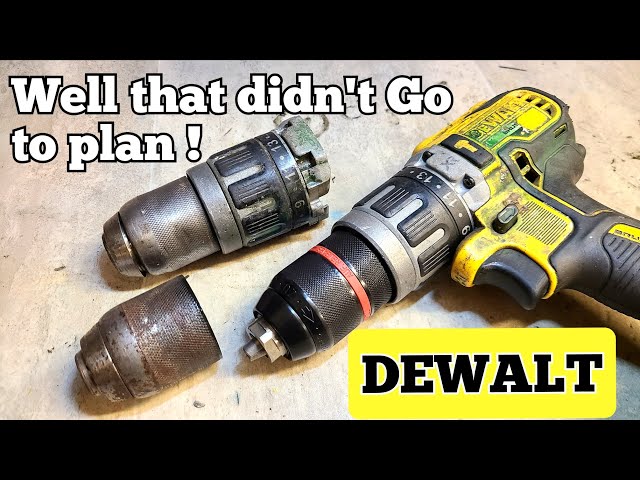
Changing the drill bit on your Dewalt might seem tricky at first, but it’s actually simple once you know the right steps. Whether you’re working on a home project or tackling a job site task, having the correct bit in place makes all the difference.
If you want to save time and avoid frustration, this guide will walk you through the process quickly and safely. Keep reading, and you’ll be ready to switch drill bits like a pro in no time.

Credit: www.youtube.com
Tools Needed
Changing the drill bit on a Dewalt requires a few simple tools. Having the right tools ready makes the process quick and safe. This section lists all the tools needed for the task.
Drill
The main tool needed is your Dewalt drill. Make sure it is powered off before changing the bit. This prevents accidents during the switch.
Chuck Key Or Keyless Chuck
Older Dewalt drills use a chuck key to loosen and tighten the bit. Some models have a keyless chuck that you turn by hand. Identify which type your drill has before starting.
New Drill Bit
Choose the correct drill bit for your project. Ensure it fits the chuck size of your Dewalt drill. Using the right bit improves drilling performance.
Safety Gloves
Wear safety gloves to protect your hands. Gloves help avoid pinches and cuts while handling the drill and bits.
Cleaning Cloth
Keep a clean cloth nearby to wipe the chuck and drill bit. Removing dust and debris ensures a secure grip and better performance.
Safety Precautions
Safety should always be your top priority before changing the drill bit on your Dewalt tool. Ignoring basic precautions can lead to accidents or damage to your drill. Taking a moment to prepare properly will save you from potential injury and ensure your project goes smoothly.
Turn Off And Unplug The Drill
Always make sure your drill is completely powered off before you start. If it’s corded, unplug it from the outlet. For cordless models, remove the battery pack to avoid accidental starts.
Think about how easy it is to accidentally press the trigger without realizing it. Keeping the drill disconnected from power prevents any unexpected movement.
Wear Protective Gear
Put on safety glasses to protect your eyes from metal shavings or dust. Gloves can also help protect your hands from sharp edges on the drill bit or chuck.
Even if the task seems quick, those tiny bits of debris can cause serious eye injuries. Your hands are just as vulnerable when handling tools and bits.
Check The Drill Bit Condition
Inspect the drill bit for any cracks, rust, or dullness before installing it. Using damaged bits can cause the drill to slip or break during operation.
Have you ever had a drill bit snap mid-job? It’s not only frustrating but can also be dangerous. Always choose bits that are in good condition.
Secure The Drill Properly
Place your drill on a stable surface or hold it firmly when changing the bit. This prevents the tool from slipping or falling, which could injure you or damage the drill.
A drill that moves unexpectedly is a recipe for accidents. Stability gives you control and confidence while working.
Follow Manufacturer’s Instructions
Refer to your Dewalt drill’s manual for specific safety tips and bit-changing procedures. Each model may have unique features or requirements you should know.
Ignoring the manual can lead to mistakes that might void your warranty or cause malfunction. Do you really want to risk that over a few moments of reading?
Position The Drill
Positioning your Dewalt drill correctly is key to making the bit change process smooth and safe. You want the drill stable and accessible to avoid slips or awkward angles. Think about where you place your hands and how the drill sits before you start handling the chuck or the bit.
Place The Drill On A Flat Surface
Set your drill down on a clean, flat surface like a workbench or sturdy table. This prevents it from rolling or tipping over while you work on it. A solid base gives you better control and reduces the risk of accidents.
Hold The Drill Securely
If you prefer to hold the drill during the bit change, grip it firmly with your non-dominant hand. Keep your fingers away from the chuck to avoid pinching. Your dominant hand should be free to turn the chuck collar or use the key if your model requires one.
Orient The Drill For Easy Access
Rotate the drill so the chuck faces upwards or towards you. This orientation makes it easier to see the bit and the chuck mechanism clearly. It also reduces strain on your wrist and allows better leverage when loosening or tightening the chuck.
Check The Drill’s Power Source
Before changing the bit, make sure the drill is switched off and unplugged or the battery is removed. This simple step protects you from unexpected starts. Have you ever had the drill kick on mid-change? It’s not just startling—it can be dangerous.

Credit: www.amazon.com
Loosen The Chuck
Loosening the chuck on your Dewalt drill is the essential first step to swapping out drill bits safely and efficiently. The chuck is the part that holds the bit in place, and it needs to be loosened properly before you can remove the old bit or insert a new one.
Understanding how to loosen the chuck correctly can save you time and prevent damage to both your drill and bits. Have you ever struggled with a stuck bit because the chuck wasn’t loosened right? Let’s break down how to do this smoothly.
Identify Your Dewalt Chuck Type
Dewalt drills commonly come with two types of chucks: keyless and keyed.
- Keyless chuck:You can loosen it by hand, which is faster and more convenient.
- Keyed chuck:Requires a chuck key to loosen and tighten the bit securely.
Knowing which type you have helps you prepare the right tools before starting.
Loosen A Keyless Chuck By Hand
Grip the chuck firmly with one hand while holding the drill body with the other.
Rotate the chuck counterclockwise (to the left) to loosen its grip on the drill bit.
If it feels stuck, try turning it while applying a bit more force, but avoid excessive pressure to prevent damage.
Use The Chuck Key For Keyed Chucks
Insert the chuck key into the hole on the side of the chuck.
Turn the key counterclockwise to loosen the jaws holding the drill bit.
Make sure to keep the chuck key fully engaged so it doesn’t slip and cause injury or damage.
Tips To Make Loosening Easier
- Wear gloves for better grip if the chuck is oily or slippery.
- Tap lightly with a rubber mallet if the chuck is stubborn but be gentle.
- Ensure the drill is switched off and unplugged or the battery is removed before working on the chuck.
How much time do you spend fighting with a stuck chuck? Taking a moment to loosen it properly can make your drilling projects much smoother.
Remove The Old Bit
Removing the old drill bit from your Dewalt drill is a simple task but requires a bit of care to avoid any damage to the chuck or the bit itself. This step is crucial before you can insert a new bit, especially if the current one is worn out or the wrong size for your project.
Many people struggle with stuck bits or worry about stripping the chuck threads. Knowing the right way to remove the bit not only saves time but also extends the life of your tool. Have you ever tried to force a bit out only to make the problem worse? Let’s avoid that.
Loosen The Chuck By Hand
Your Dewalt drill usually features a keyless chuck, making it easy to loosen the bit without extra tools. Hold the drill firmly and turn the chuck sleeve counterclockwise with your hand. This action opens the jaws that grip the bit, allowing you to pull it out smoothly.
If the bit is tight, apply steady pressure rather than sudden force. This prevents stripping the chuck’s grip mechanism. A little patience here goes a long way.
Use The Chuck Key For A Tighter Grip
If your Dewalt drill has a keyed chuck, locate the chuck key and fit it into the hole on the chuck. Turn the key counterclockwise to loosen the jaws holding the bit. The extra leverage from the key helps free bits that are stuck or tightened too much by previous use.
Make sure you keep hold of the chuck key once you remove the bit. Losing it can slow down your workflow next time. Have you checked if your drill uses a keyed or keyless chuck before starting?
Remove The Bit Carefully
Once the chuck is loose, gently pull the bit straight out from the chuck. Avoid wiggling it excessively, as this can damage the bit or the chuck. If the bit doesn’t come out easily, tighten and loosen the chuck again to reset the grip.
Inspect the bit for wear or damage before discarding or replacing it. Keeping worn bits can ruin your project or cause injury. What’s the oldest bit you’ve used before deciding to change it?
Insert The New Bit
Inserting a new bit into your Dewalt drill is a straightforward task that sets the stage for your project’s success. Making sure the bit is properly seated ensures efficient drilling and prevents damage to your tool or workpiece. Let’s walk through how to get that new bit in place with confidence and ease.
Prepare The Drill Chuck For The New Bit
Start by opening the chuck jaws wide enough to fit the new bit. Hold the drill firmly and turn the chuck collar counterclockwise to loosen it. If your drill has a keyless chuck, you can do this by hand; otherwise, use the chuck key provided with your tool.
Have you ever tried forcing a bit in without loosening the chuck fully? It usually leads to frustration and potential damage. Taking a moment to open the chuck correctly saves time and hassle.
Insert The New Bit Straight And Firmly
Slide the bit straight into the chuck, pushing it in as far as it will go. Keep the bit aligned with the chuck to avoid crooked drilling later. A firm push ensures the bit sits securely inside the jaws.
Think about how a loose bit can wobble and ruin your work. By ensuring the bit is fully inserted, you prevent slippage and maintain control over your drilling.
Tighten The Chuck To Secure The Bit
Once the bit is in place, tighten the chuck by turning the collar clockwise. If your drill uses a keyless chuck, twist it firmly by hand. With a keyed chuck, use the chuck key to tighten each side evenly.
- Make sure the bit doesn’t move when you pull on it gently.
- Double-check the tightness before starting your drilling task.
Many users overlook this step and end up with loose bits mid-project. Have you ever had the drill bit slip unexpectedly? Proper tightening prevents those interruptions.
Tighten The Chuck
Tightening the chuck is a key step in securing the drill bit on your Dewalt drill. It holds the bit firmly in place and prevents it from slipping during use. Properly tightening the chuck ensures safety and accuracy in your drilling tasks.
The chuck is the round part at the front of the drill. It opens and closes to hold different drill bits. After placing the bit inside, tightening the chuck locks it securely. This process requires the right technique to avoid damage and ensure a solid grip.
Tighten The Chuck By Hand
Hold the drill firmly in one hand. Use your other hand to turn the chuck clockwise. Keep turning until you feel strong resistance. Do not overtighten to avoid damaging the chuck or drill bit.
Use The Chuck Key For Extra Tightening
Some Dewalt drills use a chuck key to tighten. Insert the key into the holes on the chuck. Turn the key clockwise to tighten the chuck firmly. Remove the key before starting the drill for safety.
Check The Drill Bit Stability
- Try to wiggle the drill bit gently.
- If it moves, tighten the chuck more.
- The bit should not shift or loosen.
Test The Drill Bit Before Use
Turn the drill on at low speed. Watch the bit closely for any wobble. A steady bit means the chuck is tight. Stop the drill immediately if you see any movement.
Credit: www.tiktok.com
Test The Drill
Testing the drill after changing the bit is essential. It ensures the bit is secure and works correctly. This step helps avoid accidents and poor drilling results. Follow these simple checks to test your Dewalt drill safely and effectively.
Check The Bit Tightness
Hold the drill firmly. Try to wiggle the bit gently. It should not move or feel loose. A loose bit can cause damage or slip during use.
Run The Drill At Low Speed
Power the drill on at low speed. Listen for any unusual sounds or vibrations. The bit should spin smoothly and steadily. Stop immediately if you hear grinding or rattling.
Test The Drill With Light Pressure
Press the drill lightly against a scrap piece of wood or metal. Watch how the bit cuts or drills. It should move easily without slipping or stalling.
Inspect The Bit Alignment
Look closely at the bit while it spins. The bit should not wobble or shake. Wobbling means the bit is not installed correctly.
Ensure Safety Gear Is Ready
Wear safety glasses before testing. Keep hands clear of the spinning bit. Safety protects you from flying debris or accidents.
Troubleshooting Tips
Changing the drill bit on a Dewalt can sometimes present challenges. These troubleshooting tips help fix common problems quickly. Understanding these issues keeps your tool working smoothly and safely.
Drill Bit Won’t Tighten
Check if the chuck is clean and free from debris. Dirt can stop the bit from locking properly. Use a cloth to wipe the chuck. Try tightening the chuck firmly by hand.
If it still won’t tighten, the chuck key might be worn out. Replace the chuck key with a new one. Also, make sure you turn the key in the correct direction.
Drill Bit Slips During Use
Slipping bits often mean the chuck is not tight enough. Stop the drill and tighten the chuck completely. Avoid overtightening, which can damage the bit or chuck.
Check the bit’s shank for damage. A worn or bent shank can cause slipping. Replace any damaged drill bits immediately.
Chuck Is Difficult To Turn
A stiff chuck may have rust or dried grease inside. Apply a small amount of light oil to the chuck. Work the chuck back and forth to spread the oil.
Do not force the chuck if it remains stiff. This can damage the mechanism. Seek professional help if oiling doesn’t improve the movement.
Bit Does Not Fit The Chuck
Verify the size of the drill bit matches the chuck’s capacity. Dewalt drills often use a 1/2 inch or 3/8 inch chuck. Using the wrong size bit can cause fitting issues.
Use drill bits with smooth, straight shanks. Avoid bits with damaged or irregular shanks. This ensures a secure fit and better performance.
Frequently Asked Questions
How Do I Unlock The Chuck On A Dewalt Drill?
To unlock the chuck, hold the drill firmly. Rotate the chuck sleeve counterclockwise until it loosens. This releases the drill bit for removal or replacement.
What Tools Are Needed To Change A Dewalt Drill Bit?
Most Dewalt drills have keyless chucks. No extra tools are needed. Simply hand-turn the chuck to change the bit easily.
Can I Use Any Drill Bit With A Dewalt Drill?
Dewalt drills accept standard drill bits matching the chuck size. Always use bits compatible with the drill’s chuck diameter for safe and effective operation.
How Do I Properly Insert A New Drill Bit?
Loosen the chuck by turning it counterclockwise. Insert the drill bit fully into the chuck. Tighten the chuck by turning clockwise until secure.
Conclusion
Changing the drill bit on a Dewalt is simple and quick. Always make sure the drill is off before starting. Use the chuck key or hand-tighten the chuck to remove the old bit. Insert the new bit straight and tighten it firmly.
Doing this right keeps your work safe and precise. Practice a few times to feel confident. Now, you are ready for your next project with ease.






