
Imagine walking into your home and having the lights turn on automatically, your favorite music start playing, and the thermostat adjust to the perfect temperature—all without lifting a finger. Sounds like a dream, right?
With Alexa, this dream can become your everyday reality. If you’ve ever wondered how to make your home smarter and more convenient, you’re in the right place. You’ll discover simple steps to automate your home with Alexa, transforming your living space into a seamless, hands-free environment.
Ready to take control and enjoy the comfort you deserve? Let’s dive in.
Setting Up Alexa
Setting up Alexa is the first step to automating your home easily. The process involves picking the right device, connecting it to your Wi-Fi network, and installing the Alexa app. Each part is simple and quick, even for beginners.
Choosing The Right Device
Select a device that fits your needs and budget. Echo Dot is compact and affordable. Echo Show adds a screen for video and visuals. Consider where you want to place it in your home. Sound quality and design matter too.
Connecting To Wi-fi
Alexa needs a stable Wi-Fi connection to work properly. Turn on your device and follow the voice prompts. Use the Alexa app to connect to your home Wi-Fi network. Make sure your Wi-Fi signal is strong where Alexa is placed.
Installing The Alexa App
Download the Alexa app from the App Store or Google Play. Open the app and sign in with your Amazon account. Follow the on-screen instructions to link your device. The app helps manage settings and add smart home devices.
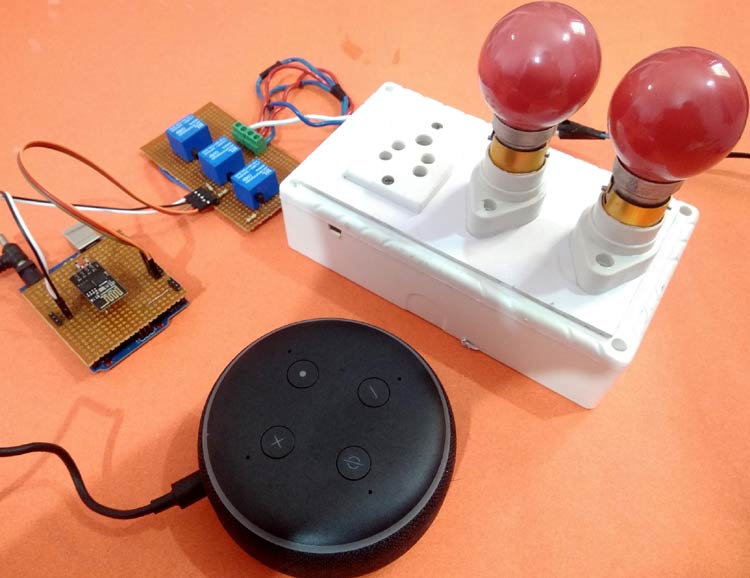
Credit: circuitdigest.com
Smart Home Devices
Smart home devices form the foundation of automating your living space with Alexa. They allow you to control lighting, temperature, security, and more using just your voice or app commands. Choosing the right devices can transform your daily routines and increase your home’s efficiency.
Smart Lighting
Smart lighting lets you control your lights remotely or with voice commands through Alexa. You can set schedules, adjust brightness, and even change colors to match your mood or activities. Imagine walking into a dimly lit room that brightens automatically just as you enter—how much more convenient would that be?
Popular options include Philips Hue and LIFX bulbs, which easily connect to Alexa. They also support routines, so your lights can turn off when you leave or gradually brighten in the morning to wake you gently.
Smart Thermostats
A smart thermostat helps you manage your home’s temperature with precision and ease. Alexa can adjust the thermostat based on your schedule, saving energy when you’re away and warming the house before you return. Have you noticed how much you adjust the temperature manually? Automating this can free up your attention for more important things.
Brands like Nest and Ecobee work seamlessly with Alexa, providing energy reports and remote control. You can even ask Alexa what the temperature is without leaving your chair.
Smart Locks
Smart locks add a layer of security and convenience to your home automation. You can lock or unlock your doors remotely using Alexa, or create access codes for family and friends. Think about how often you’ve worried whether the door was locked after leaving—this feature puts those concerns to rest.
Look for locks from August or Schlage that support Alexa voice commands. Integrating them into your routine can allow you to lock the door just by saying, “Alexa, lock the front door.”
Smart Security Cameras
Smart security cameras keep an eye on your home and send alerts to your phone when they detect motion. When connected to Alexa, you can view live feeds on Echo Show devices or ask for recent activity updates. Wouldn’t it be reassuring to check who’s at the door without getting up?
Ring and Arlo offer cameras that integrate well with Alexa, providing two-way audio and night vision. These cameras add peace of mind and help you stay connected to your home from anywhere.
Voice Commands
Voice commands are the heart of home automation with Alexa. They let you control devices simply by speaking. This hands-free method adds ease and speed to daily tasks. Alexa understands clear and simple commands. You can turn lights on, adjust thermostats, and play music without lifting a finger. Customizing these commands makes your smart home even smarter.
Creating Custom Commands
Alexa allows you to create your own voice commands. These commands trigger specific actions or groups of actions. Use the Alexa app to set them up easily. Choose phrases that feel natural to you. For example, saying “Movie time” can dim lights and start the TV. Custom commands save time and make routines smoother.
Controlling Devices
Voice commands control many smart devices in your home. Lights, plugs, cameras, and thermostats respond instantly. Just say the device name and action. For example:
- “Alexa, turn off the kitchen lights.”
- “Alexa, set the thermostat to 72 degrees.”
- “Alexa, lock the front door.”
These commands work anywhere in your home with an Alexa device nearby. No need to find a phone or switch.
Managing Routines
Routines combine multiple actions into one command. Say a phrase and Alexa handles the rest. For example, “Good morning” can open blinds, read news, and start the coffee maker. Create routines for different times or moods. The Alexa app guides you through setting them up. Routines make your day easier and more organized.

Credit: kamonk.in
Creating Routines
Creating routines with Alexa helps automate your daily tasks. Routines group multiple actions triggered by a single command or event. This saves time and makes life easier at home. You can set up routines for different parts of your day or special needs. Alexa routines can control smart devices, play music, give news updates, and much more.
Morning Routine Setup
Start your day smoothly by creating a morning routine. Alexa can turn on the lights, read the weather, and play your favorite news. You can add reminders or alerts to help you stay on track. Use voice commands or schedule routines to run automatically at a set time.
- Turn on bedroom lights gradually
- Read weather and news updates
- Start your favorite morning playlist
- Give reminders for important tasks
Evening Routine Setup
Help yourself relax with an evening routine. Alexa can dim the lights, adjust the thermostat, and play calming sounds. Set routines to prepare your home for bedtime. This routine can also remind you to lock doors or turn off devices.
- Dim or turn off lights
- Play relaxing music or sounds
- Adjust thermostat for comfort
- Remind to lock doors or switch off devices
Custom Routine Ideas
Personalize routines to fit your lifestyle. Combine actions that suit your daily habits. Use routines for workouts, cooking, or arriving home. Experiment with different triggers like voice commands, schedules, or device detection.
- Workout routine with music and timers
- Cooking routine with timers and recipe reading
- Coming home routine to turn on lights and adjust temperature
- Goodbye routine to switch off all smart devices
Troubleshooting Common Issues
Setting up your smart home with Alexa can be exciting, but sometimes issues pop up that slow down your progress. Troubleshooting these common problems quickly helps you get back to enjoying a seamless smart home experience. Let’s look at some frequent challenges and how you can fix them without frustration.
Wi-fi Connectivity Problems
Alexa relies heavily on a strong Wi-Fi connection. If your device keeps losing connection or won’t respond, the first thing to check is your Wi-Fi signal strength. Try moving your Alexa device closer to the router or removing any physical barriers like thick walls.
Restart your router and Alexa device to reset connections. Sometimes, simply disconnecting and reconnecting to the network in the Alexa app solves the issue. Also, verify that your router supports the 2.4 GHz band, as many Alexa devices don’t work well with 5 GHz networks.
Have you noticed if other smart devices on your network have similar issues? This might indicate a broader Wi-Fi problem rather than an Alexa-specific one.
Device Compatibility
Not all smart home devices work perfectly with Alexa. Before adding a new gadget, check if it’s compatible and if the necessary Alexa skill is available. Missing or outdated skills often cause devices not to respond as expected.
Ensure your smart device’s firmware is up to date. Sometimes, a simple update can fix bugs that prevent Alexa from controlling it. If a device keeps disconnecting or shows as offline in the Alexa app, try removing it and setting it up again.
Does your device’s manufacturer provide specific instructions for Alexa integration? Following those can save time and avoid common pitfalls.
Voice Recognition Challenges
Alexa’s voice recognition can sometimes misunderstand commands, especially in noisy environments. Try speaking clearly and at a moderate pace to improve accuracy. Positioning Alexa away from background noise like TVs or fans helps too.
You can also train Alexa to recognize your voice better by setting up Voice Profiles in the Alexa app. This feature allows Alexa to personalize responses and understand your commands more accurately.
If Alexa frequently mishears specific words or names, consider using alternate names or simpler commands. Have you tried changing your phrasing to see if Alexa responds better?
Privacy And Security
Privacy and security are key when automating your home with Alexa. Smart devices collect personal data to work well. Protecting this data keeps your home safe and private. Understanding how to manage privacy and secure your system helps prevent unauthorized access.
Managing Data Privacy
Alexa stores voice recordings and user preferences to improve responses. Control what data is saved by adjusting privacy settings in the Alexa app. Delete voice recordings regularly to limit stored information. Review permissions for linked devices and apps to prevent unnecessary data sharing.
Securing Your Smart Home
Secure your Wi-Fi with a strong password to block intruders. Use two-factor authentication for your Amazon account. Avoid using default passwords on smart devices. Create separate networks for smart devices and personal computers for extra safety. Check connected devices often and remove unknown ones.
Regular Updates And Maintenance
Keep Alexa and connected devices updated with the latest software. Updates fix security flaws and improve performance. Set devices to update automatically if possible. Regularly review device settings and permissions to ensure ongoing protection. Restart devices occasionally to clear temporary data and improve security.
Future Of Smart Living
The future of smart living is shaping up to be more intuitive and deeply connected to your daily routines. Alexa is evolving beyond simple voice commands, aiming to anticipate your needs and streamline your home environment. Imagine a home that not only listens but also learns and adapts to your lifestyle automatically.
Upcoming Alexa Features
Alexa will soon offer more personalized experiences through advanced voice recognition. This means it can identify who is speaking and tailor responses or control settings based on individual preferences. You might walk into a room, and Alexa adjusts lighting, music, or temperature specifically for you without needing to say a word.
Another exciting feature is improved routine automation. Alexa will allow you to create complex, multi-step routines triggered by simple phrases or even your location. For example, saying “I’m home” could unlock doors, turn on lights, and start your favorite playlist all at once.
Trends In Home Automation
- Increased Device Compatibility:More brands are making their products Alexa-compatible, giving you greater flexibility when choosing smart devices.
- Energy Efficiency Focus:Homes will use Alexa to monitor and reduce energy consumption, helping you save money and reduce your carbon footprint.
- Enhanced Security Features:Alexa will integrate better with security cameras, alarms, and sensors to provide real-time alerts and remote control for your peace of mind.
Are you ready to let your home manage itself more efficiently while you focus on what matters most?
Integrating Ai Technologies
Artificial intelligence will make Alexa smarter at understanding context. It won’t just respond to commands but will predict what you might want based on patterns it observes. For instance, if you usually dim the lights at 8 PM, Alexa could start doing this automatically.
AI will also improve Alexa’s ability to interact with other smart systems in your home, creating a seamless ecosystem. Your smart fridge could notify Alexa about groceries running low, and Alexa could add them to your shopping list or even place an order for you.
How much control are you comfortable handing over to AI in your home? This is a key question as these technologies become more integrated into everyday life.
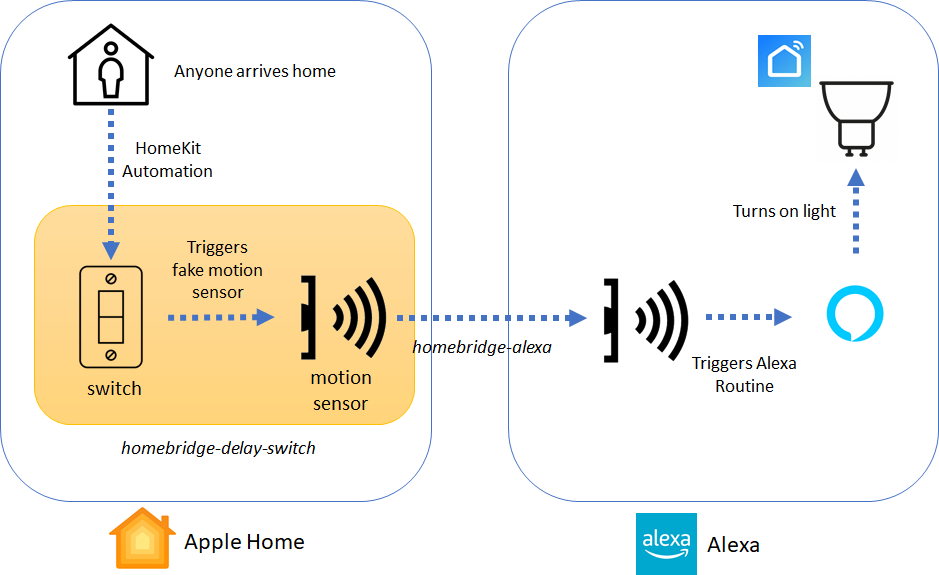
Credit: diylifetech.com
Frequently Asked Questions
How Do I Start Automating My Home With Alexa?
Begin by setting up an Alexa device and connecting smart home devices. Use the Alexa app to discover and control compatible devices easily.
What Smart Devices Work Best With Alexa?
Alexa supports smart lights, thermostats, locks, cameras, and plugs from top brands like Philips Hue and Ring. Choose devices labeled “Works with Alexa” for seamless integration.
Can I Control My Home Remotely Using Alexa?
Yes, Alexa allows remote control of smart devices through the app. You can manage your home’s lights, locks, and more from anywhere with internet access.
How Do Alexa Routines Simplify Home Automation?
Alexa Routines automate multiple tasks with a single command. For example, a “Good Night” routine can turn off lights and lock doors automatically.
Conclusion
Automating your home with Alexa makes daily life easier. You can control lights, locks, and more with simple voice commands. Setting routines saves time and adds comfort. Start small and add devices over time. Alexa learns your habits and helps keep your home smart.
Enjoy a safer, more connected living space. Try different features to find what works best. Alexa brings convenience right to your fingertips. Simple steps lead to a smarter home today.






